Screens

Video

Guide
An Ideal Software to Export Zimbra TGZ Emails with Attachments, Contacts & Calendars to Office 365 Account
 100% Safe and Secure
  30 Days Money Back*
Free Live Demo - Zimbra Migrator Utility Fully Secured Download Version
Export Zimbra TGZ files to
Are You Looking for Best Zimbra Migration Tool?
There are plenty of reasons for a user to switch from Zimbra to Office 365 account. Zimbra is a powerful email platform, but with the growth of cloud technology, many users now prefer the flexibility of Office 365.
RecoveryTools Zimbra to Office 365 Converter will allow the users to move only the specific folders. You can choose all the desired Zimbra mailbox folders accordingly directly from the utility panel.
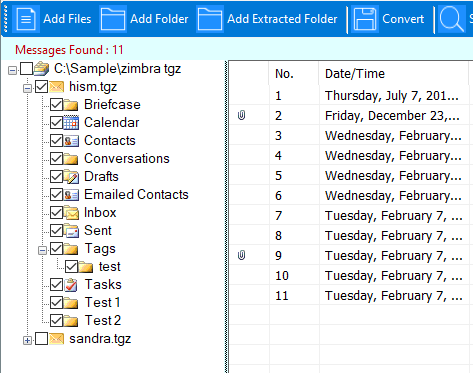
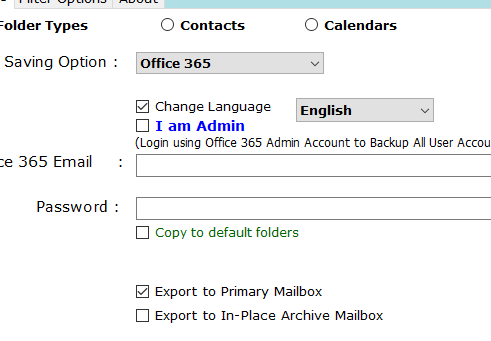
Zimbra to Office 365 Converter software will enable the users to migrate Zimbra emails to O365 admin account. It will ask the users to provide only the login credentials of their Office 365 account. This software also gives users the option to map Zimbra mailbox folders with Office 365 user accounts. It provides multiple settings to set up the Zimbra to Office 365 migration:
This allows you to:
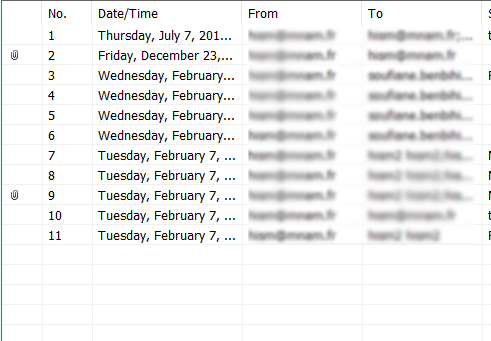
This application is designed in such a way to provide the live preview of Zimbra emails directly in its panel. It will also list all the inserted attachment files. Users can double click on any attachment file to open it directly in the utility panel.
Securely Move Your TGZ Data to the Cloud
Emails
| Email Messages | A user can migrate Zimbra emails to Office 365 with all components including email headers, formatting, message content, signature, hyperlinks, attachments, embedded elements, etc. |
| Attachments | Zimbra to Office 365 migration tool will allow the users to export emails with inserted attachment files. Users can also preview the attachments in the software panel of any type:
|
| Email Folders | RecoveryTools Zimbra to Office 365 Migrator software allows the users to export folder items successfully. It will enable them to export all the Zimbra mailbox folders to Office 365 including Inbox, Drafts, Junk Emails, Spam, etc. |
Calendars
| Calendars | The Zimbra to O365 converter software will allow the users to export calendars & recurrence items successfully. |
Contacts
| Contacts | The Zimbra to Microsoft Office 365 Converter tool will allow the users to export address book and contacts data. It will help the users in moving Zimbra contacts with all details like:
|

Migrate Zimbra Emails to Office 365
Users can successfully migrate Zimbra emails to Office 365 account. It will allow the transfer of multiple Zimbra emails & folders to O365 account from the TGZ file in batch mode. The utility will export Zimbra emails with all details to Microsoft Office 365 account.
Export Zimbra Contacts to Office 365
This utility will quickly export Zimbra contacts to Office 365 account easily. It will export Zimbra contacts with all details like First Name, Last Name, Job Description, Company Name, Business address, Business email id, personal email id, phone, mobile, fax, country/region etc.

Move Zimbra Calendars to O365
Zimbra Calendars to Office 365 Migration tool will export all calendar data in an easy & simple way. You can easily move Zimbra Calendar entries like events, reminders, schedule, meetings, appointments, etc. You do not need to worry about your calendar items while using this tool.
Key features of Zimbra to Microsoft 365 Migrator

Import Zimbra to Office 365 Directly
The utility provides an option to bulk export Zimbra to Office 365. Now move Zimbra emails, calendars, folders and briefcase to Microsoft Exchange Online. Contacts, distribution lists & groups are also supported.

Batch Migrate Zimbra to Office 365
In the case of a large number of Zimbra TGZ data files, the utility supports batch conversion of Zimbra to Office 365. Zimbra to Office 365 Migration tool will take all TGZ files as input and directly import TGZ files from Zimbra to Office 365 account. Choose the Add Folders option to enable Batch Zimbra email, calendars to Office 365 migration option.

Move Zimbra to Office 365 Webmail
The updated Zimbra to Office 365 migration tool packages the functionality to export Zimbra emails into Outlook Web Access (OWA) and Exchange Online accounts. This tool enables users to bypass the traditional method of first converting Zimbra emails to PST files and later importing the resultant PST files into Office 365 account.

Import TGZ to Office 365 Admin Account
During Zimbra to Office 365 migration process, the tool keeps the folder hierarchy and transfers 100% original data from Zimbra to Office 365 account. This tool maintains the tag, category, read / unread property of the email exactly as it is in the Zimbra Mailbox folder before importing it into Office 365 Mailbox Account.

Export Zimbra to O365 with Attachments
This tool solves the challenge of migrating Zimbra emails to an Office 365 cloud account with all embedded email attachments. Now users can save all email embedded attachments to Office 365 account directly without any modifications. You can get the original email attachments on your Office 365 account after completing the migration process.

Standard Zimbra to Office 365 Migrator
Due to its rich expertise in the field of email migration, RecoveryTools Zimbra to Office 365 Migration tool is trusted by many IT professionals as a fast, easy and effective utility. The software is designed in such a way that any user can migrate Zimbra to Office 365 & Outlook Web Access terminal without any trouble.

Dual Zimbra TGZ Data Selection Mode
There are many situations when a user needs to migrate multiple Zimbra Profiles to Office 365 account. The software comes with dual selection options to choose multiple Zimbra TGZ files at once. The select folders option allows you to choose multiple TGZ files in a folder or sub-folder. You can also select the single Zimbra TGZ file with the Select Files options.

Dedicated Microsoft Windows OS Program
The software supports all editions of Microsoft Windows Operating System including Windows 11, 10, 8.1, 8, 7 and Windows Server 2025, 2022, 2019, 2016, 2012, etc. The software works on all x64 & x86 bits of Microsoft Windows Editions.

Transfer All Zimbra Data to Office 365
This is the best software to export Zimbra data to Office 365. It supports exporting all the data from the TGZ file including Emails, Contacts & Address Book, Calendars & Recurrences, etc. It supports the migration of multiple Zimbra files to Office 365 account in batch mode.

Advanced User Mailbox Mapping
When using the 'I am Admin' mode, administrators can effortlessly map multiple Zimbra user profiles directly to their respective Microsoft 365 accounts. This automated mapping eliminates the need for manual configuration, ensuring emails, contacts, and calendars are routed to the exact destination users in bulk.
Compare features to choose the right migration plan for your data
 Download
  Buy
Buy Trusted by IT administrators and businesses worldwide for a secure, flawless, and 100% accurate migration to the cloud.
RecoveryTools is a trusted brand in the field of email migration. Users should not worry about the integrity of their data as the utility will preserve all the items during the conversion. This tool will not make any changes to the original metadata & properties of Zimbra emails while changing them to Office 365 account.
This tool helps the users in better managing the process of migrating Zimbra data to Office 365 account. It will ask the users to provide only the login credentials of Office 365 account i.e., Username & Password. If a user plans to migrate Zimbra to an Office 365 administrator account, the utility offers this option too.
Verified Requirements You Should Know Before Installing the Zimbra to Office 365 Migration Tool
Demo Version Restrictions
Demo Edition allows you to only export 25 items from every folder.
Professionals and experts often test this trial before moving to the licensed version for unlimited migration.
System Specifications
Storage
Around 200 MB of free disk space
Memory
2 GB RAM
(4 GB recommended by professionals)
CPU
Intel® Pentium 2.4 GHz processor
Verified Support Systems
Trusted Electronic Delivery
After your order verification, the product is delivered automatically through email, including the download link and activation key.
Frequently Asked Questions
Follow these steps to migrate Zimbra to Office 365 account:
Yes, to increase the adaptability of the Zimbra TGZ to Office 365 converter, now users can sort their emails with filters based on To, Cc, Bcc, Attachments, Date, etc. The user needs to click on the Search button to list all the specified emails.
No, our tool is Windows-based. It works on Windows 11, 10, 8.1, 8, 7 and Windows Server (32-bit and 64-bit).
Yes, the tool maintains the parent/child relationship and preserves recurring Zimbra calendar entries and their details during the migration.
Yes, it will prevent the duplication of messages during file transformation. The utility only migrates unique messages per folder.
The working of the Zimbra to Office 365 migration tool is free from all file size limitations. Users can perform an unlimited transfer of emails with all embedded objects and files without limitations.
What Customers Are Saying
"My organization is planning to switch from Zimbra Desktop to Office 365 account. This is a leading Zimbra to Office 365 Migration tool. Thanks to the developers of this amazing toolkit to export data."


Helena Kidman, Barcelona
"Zimbra to Office 365 Migration tool provides solution to all those users whose queries are regarding how to upload Zimbra Desktop items to Office 365 account on Web. The experience with this tool is very smooth and admirable."

Rachel Mcclein, USA
"I must say that Zimbra to Office 365 Migration tool is an astonishing program. It helped me to import Zimbra emails to Microsoft Office 365 Admin account. It also helped me in changing the mailbox languages according to their needs."

Paris Newman, Belgium


 Support
  Blog
Blog  +1 7025533020