Screens

Video
Download Free Trial of the Tool and Convert First 25 Emails Per Folder.
 100% Safe and Secure
  30 Days Money Back*
Easy Steps to Use the Pegasus Mail Migrator

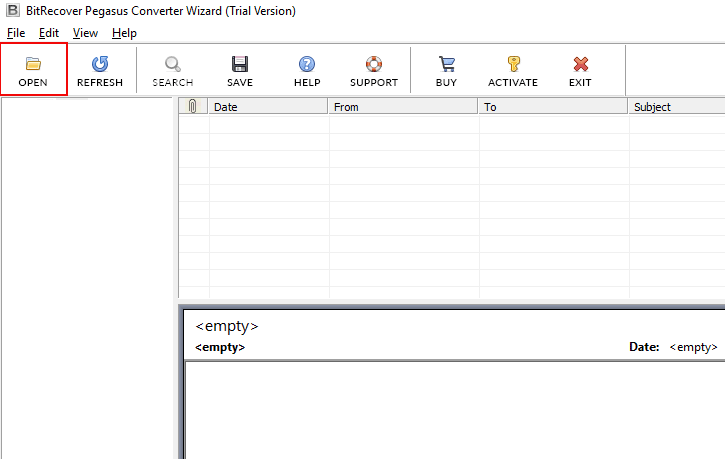
Run Pegasus Mail Migrator
Run the software and click Open to load files.
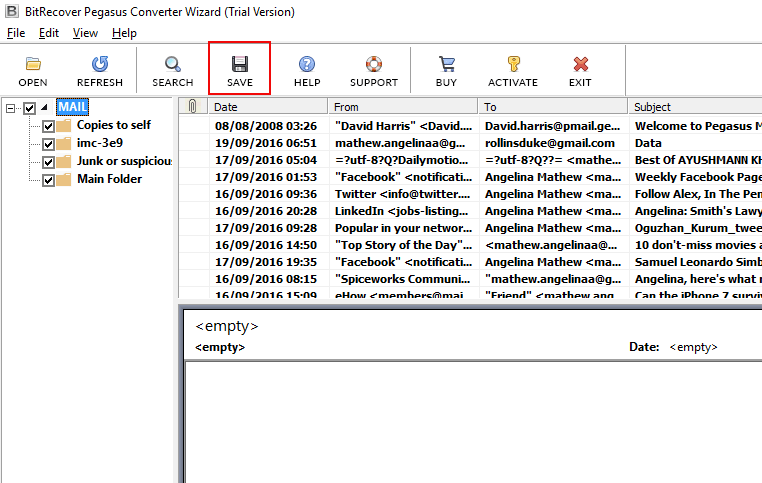
Select Pegasus Emails
Preview Pegasus emails and click Save to continue.
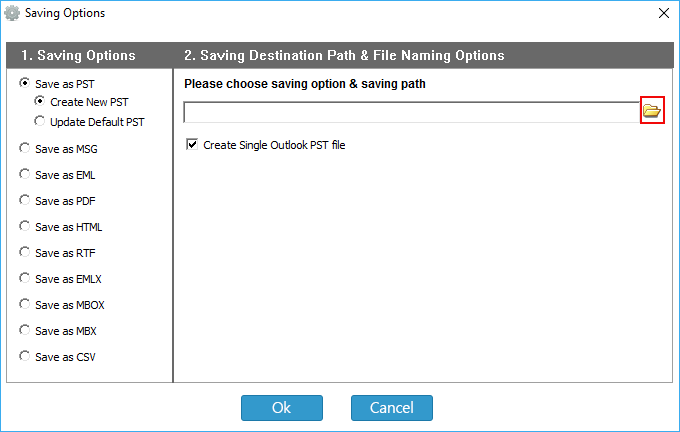
Start Pegasus Saving Process
Select the saving option, saving path and naming option.
Different File Formats of Pegasus Mail Converter Tool

PST
EML
MBOX
MSG
PDF
Eudora Mail
Thunderbird
Apple Mail
CSV
Windows Live Mail
Learn How to Export Pegasus PMM, CNM and PMI Files to Multiple Formats

Convert PMM/PMI/CNM to Popular Formats
This Pegasus Mail Migration software exports Pegasus PMM, PMI or CNM mailbox items to many email and document formats. Users can export Pegasus Mail files to PST, EML, MBX, MBOX, CSV, MSG, EMLX, PDF, etc. without any third-party application.

This software keeps track of all properties, attributes & folder hierarchy of the Pegasus Mail files. The software preserves all the internal formatting & structure of the mailbox items during the conversion of Pegasus Mail file. All Pegasus mailbox folders keep the same structure and hierarchy as the original.

The software converts multiple PMM or CNM files in batch to save time. The Pegasus Mail Migration tool exports many email items with attachments to the required file format. The software provides dual method to load *.pmm, *.pmi or *.cnm files.

This Pegasus Mail Converter to Outlook software converts PMM or CNM files to Unicode PST format. Unicode PST files work in Outlook 2003 and later, so you can import Pegasus Mail to Outlook 2016, 2013, 2010, 2007 and 2003.

This Pegasus Mail Converter exports PMM files to MBOX format, which most email clients support. Users can move Pegasus Mail to Thunderbird, Apple Mail, Entourage, DreamMail and eM Client.

This software helps users export mailbox items to Microsoft Outlook Express. Convert Pegasus Mail to MBX format to migrate from Pmail to Outlook Express. MBX files work with both Outlook Express and Eudora.
Convert Pegasus Mail to EML file format to import all mailbox files of PMM or CNM files to Windows Live Mail client. EML files work in apps like Windows Live Mail and eM Client. When you save as EML, the tool also gives file naming options.
Apple Mail stores single messages as EMLX files. To move selected Pegasus emails to Apple Mail, convert them to EMLX. This application creates a separate EMLX file for each Pegasus email.
MSG is the single message format of Microsoft Outlook. This application has a separate option to save Pegasus emails as MSG files. You get a separate MSG file for each Pegasus Mail message, with 10+ file naming formats to manage them.
Convert Pegasus Mail to PDF (Portable Document Format) to share or store emails safely on your hard drive. PDF files are hard to edit, which makes them a good way to store or share documents.
This software can convert Pegasus Mail to RTF (Rich Text Format) files that open in Microsoft Word or WordPad.
This software provides an additional option to convert Pegasus Mail to CSV file format to easily open them in Microsoft Excel application. This application also asks the users to include or exclude the attachment files inserted with the emails. Export Pegasus emails to *.csv (Comma Separated Values) files that store the information in rows.
Know Complete Process of Pegasus Mail Converter.
This video shows the complete Pegasus Mail conversion process. It answers common questions like how to back up Pegasus Mail and how to import Pegasus Mail to Outlook, Thunderbird, Apple Mail, Eudora, MBOX, EMLX or CSV.
Step-by-Step Video Guide of Pegasus Migrator
Demo Limitations & Pre-Requisites to Convert Pegasus Mail to Outlook
Trial Limitations
The Demo Version of Pegasus Migrator converts only 25 items per folder from PMM and CNM files.
System Specifications
Hard Disk Space
Minimum 200 MB Space
RAM
2 GB RAM
Processor
Intel® Pentium 1.1 GHz processor
Operating System
Electronic Delivery
RecoveryTools Pegasus Mail Converter Software will be delivered automatically. After your payment is confirmed, you will receive an email with a link to download the product and the activation key.
Frequently Asked Questions
No, the software works on its own. You do not need to install or configure the Pegasus Mail client. It converts Pegasus PMM or PMI files to PST or CSV in a few clicks.
Yes. Convert Pegasus Mail to PST with this software, then open or import the PST file in Microsoft Outlook.
You can move your items from the old Pegasus Mail to the new one. Follow these steps:
Convert Pegasus Mail to Outlook - DEMO and Licensed Version
Download  Buy
Buy I am delighted with the performance of this Pegasus Mail Converter. I recently decided to manage my emails in Microsoft Outlook, but I didn't know how. This application proved to be a good choice for me to export Pegasus PMM files to Outlook within a few minutes.


Richard Stone, Poland


 Support
  Blog
Blog  +1 7025533020