RecoveryTools PST to PDF converter is awarded by SoftwareSuggest for exporting entire PST file to PDF format in bulk quickly with ease.


Most reliable tool to export PST emails, attachments, contacts, calendars, and tasks to PDF while maintaining the original formatting and metadata. Batch convert large, Unicode and ANSI PST files to PDF without Outlook.
*Free download to scan and preview your lost or deleted data.
Watch the video to learn how to use our PST to PDF converter tool.
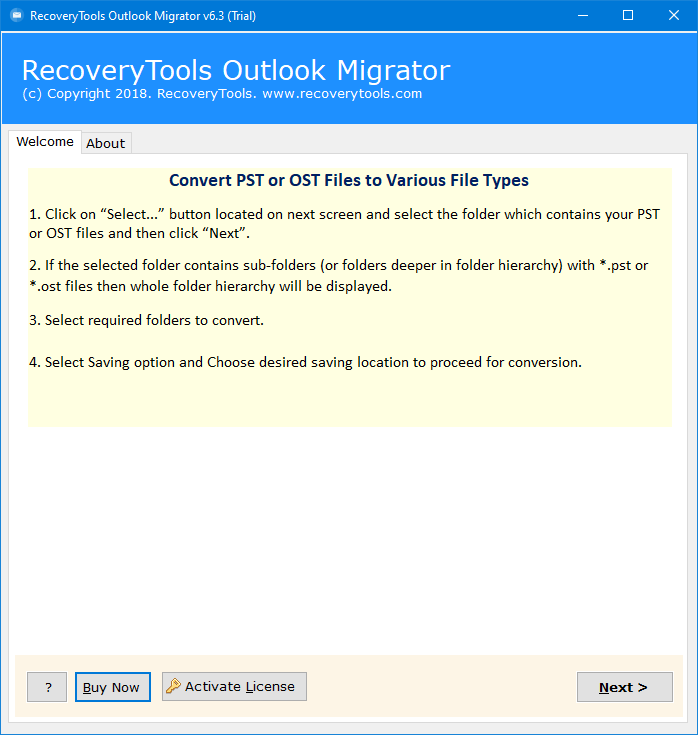
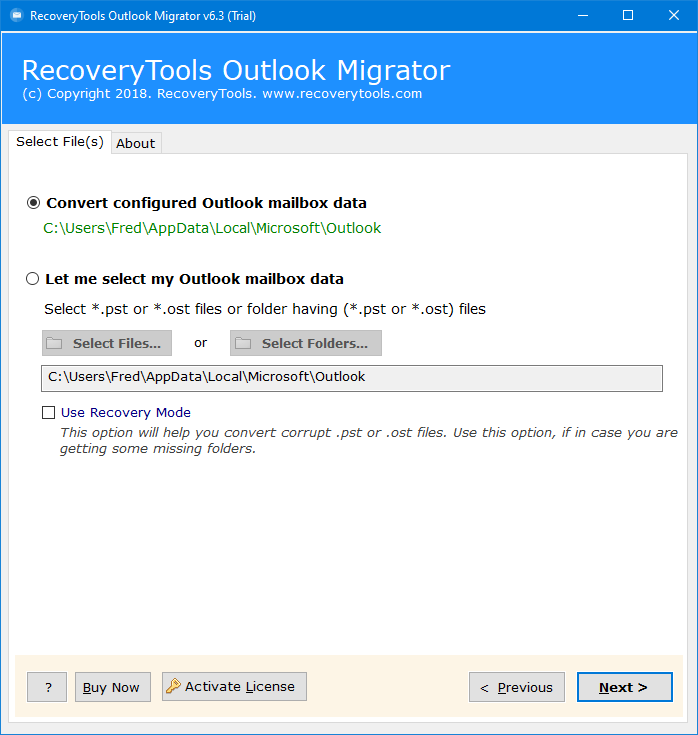
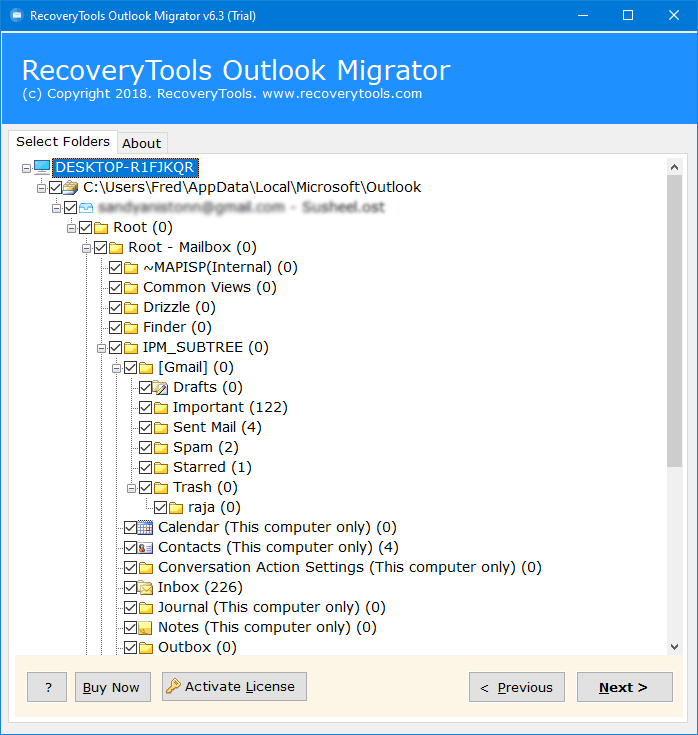
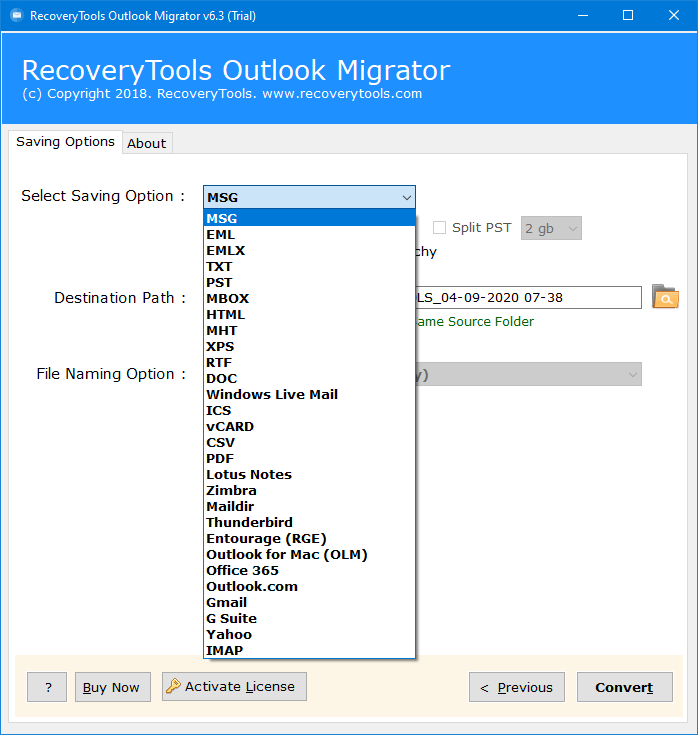
Know the steps to easily convert PST file to Adobe PDF documents:
Our tool provides advanced capabilities to export PST files to PDF

Built-In PST Recovery
Use ‘Recovery Mode’ feature to convert corrupted or damaged PST files to healthy PDF files. First repair corrupt Outlook PST file, then convert it to PDF documents. There is no need to use a separate software to deal with inaccessible files.

Preview & Selective Export
PST to PDF converter provides detailed Preview of entire PST folders and subfolders and Filter options where you can convert only desired emails, folders, and items that you want and convert to PDF.

Preserve Original Mailbox
Keeps original folder hierarchy and essential email properties during the PST to PDF conversion. Inbox, Sent Items, Drafts, and custom folders or PST remain organized in the exported output PDF file.
Export entire PST mailbox data to PDF without losing formatting.

Emails

Contacts

Calendars

Attachment

Tasks

To-Do

Journals

Notes

Meetings
Core functionalities of the tool to convert PST File to PDF with attachments without data loss

Convert PST to PDF without Outlook
Using this standalone tool, you can easily export PST files to PDF without having Outlook installed on PC. It does not require Outlook or any other application to convert PST to PDF. Just run the software, add your PST files, and convert to PDF without any limitations.

Convert Entire PST file to PDF
RecoveryTools PST to PDF converter allows to export emails, attachments, contacts, calendars, and metadata from PST to PDF. Get exact copy of your PST file data in PDF format without missing anything. Maintain date, sender, recipient, or folder,

Export PST to PDF with Attachments
The tool will also export the attachment files with the Outlook emails. The software supports the conversion of all attachment types. It will embed the attachments like Documents (DOC, PDF, RTF, HTML), Archives (Zip, TGZ, RAR), Images (PNG, JPG, GIF, PSD) etc. into the converted PDF documents.

PST to PDF software will enable the users to convert emails with original formatting. It preserves document formatting & email components like Hyperlinks, Page Layout, Images, Page Orientation, Margin, Page Size etc. The software will also keep the Mail Folder Structure of PST emails like Inbox, Drafts, Sent Items etc.

This PST to PDF converter facilitates the export of large number of emails with including all other data items. One can exclude unwanted PST folders or deleted items before saving them to PDF files. All the files or folders are displayed as Folder explorer style and users can check only the desired folders and respective items to export and save the emails as PDF files.

A key feature of this tool is the ability to batch export emails to PDF. This significantly reduces the time required for file transfers. The utility provides two methods for loading data: 'Add Files' for selecting specific items, or 'Add Folders' for the batch conversion of an entire directory.

This PST to PDF converter is free to download and works by creating a separate resultant file for each email. As a PST file may contain millions of emails and hence, accessing and managing such a large number of files can be difficult for users. Therefore, to easily sort or order them the tool provides various File Naming Formats and options to save PDF files.

For the user’s sake of convenience, this utility allows the users to save the resultant PDF files at the required storage location. The utility also provides the users option to convert PST files to PDF in a New Folder which can be created directly through the application panel. Additionally, there is no requirement of Microsoft Outlook or Adobe Acrobat installation to perform the conversion.

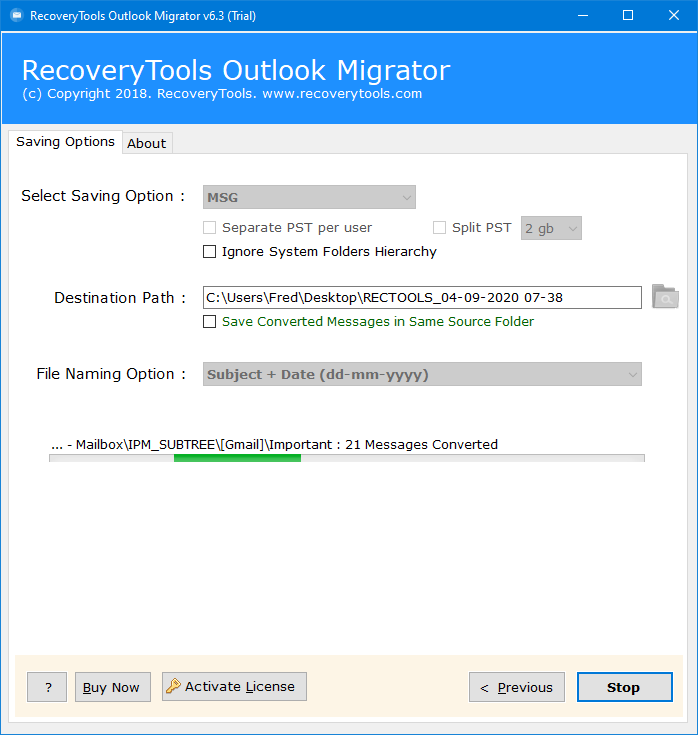
This utility is able to provide the most interactive environment for a user to convert Outlook email to PDF in a simplified and user-friendly environment. The converter software provides easy steps for the users to export their emails from PST to PDF file. All the options are gathered onto a single panel like conversion format, destination path, or naming option.

This PST to PDF converter software is designed to support PST file of Outlook 2021, 2019, 2016, 2013, 2010, 2007, and other versions. You can run this application on all latest versions of Microsoft Windows i.e. Win 11, 10, 8.1, 8, 7, XP, Vista etc. for both 32-bit & 64-bit OS editions without any problem.

This PST to PDF wizard utility is coded with the functionality to generate a saving log report for the converted Outlook data file. Using this log report, one can track the PST to PDF conversion based on the count of converted and non-converted files.

As we have discussed, this software comes with the selective filter settings to convert PST to PDF with attachments. If you are a regular user then you can export your selective filter settings on your PC and use it again for future reference.
Situations where users use our tool to convert PST to PDF

Access Data Across Platforms
PST files are specific to Microsoft Outlook and can only be opened using Outlook. By converting them to PDF file format, you can access your email data on different devices and platforms.

Archive Email Data
PDF format is an excellent format for archiving data because it is universally accepted, easy to read, and difficult to modify. By converting your PST files to PDF format, you can create an archive of your email data that can be easily accessed and searched.

Useful in Legal Proceedings
In legal proceedings, email data may be required as evidence. By converting PST to PDF format, you can create a readable and searchable document that can be submitted as evidence.

Share Email Data with Others
PDF format is an excellent format for sharing documents with others because it is universally accepted and can be opened on any device with a PDF reader. By converting your PST files to PDF, you can easily share your email data with others.
System Requirements to Run This PST to PDF Conversion Software
Trial Limitations
Free PST to PDF Converter (DEMO version) allows users to export 25 emails per folder to PDF documents with attachments.
System Specifications
Hard Disk Space
Minimum 200 MB
RAM
2 GB RAM
Processor
Intel Pentium 1 GHz Processor
(2.4 GHz Processor Recommended)
Supported Editions
Electronic Delivery
RecoveryTools PST to PDF converter software will be delivered automatically. After your payment is confirmed, you will receive an email with a link to download the product and the activation key.
Know the Answers to Most Asked User Queries
The software supports PST files created by all versions of Microsoft Outlook, including Outlook 2021, 2019, 2016, 2013, 2010, 2007, and earlier.
Yes, this tool provides an advanced Recovery Mode which allows it to save the Outlook emails as PDF files from corrupted or damaged PST files. Users first need to enable the Recovery Mode option after that the tool will scan for the corrupted or damaged portion. Please note that in Recovery Mode, the toolkit may take extra time for conversion so please be patient.
No, converting specific emails is not supported. But you can choose specific folders to convert using the software's checkmark option.
Yes, the software ensures that data is preserved during the conversion process. This means that the data remains intact and is not lost or corrupted.
Yes, PDF files can be accessed on different devices and platforms, making it easy to access your email data wherever you are.
Yes, you can download a free trial version of the software to test it out before purchasing the full version.
Yes, PST files do contain attachments. PST is a format used by Microsoft Outlook to store emails, attachments, contacts, calendars, tasks, notes,etc. Using our PST to PDF converter anyone can convert PST to PDF with attachments and all the other data.
No, using Adobe Acrobat you cannot directly convert PST files to PDF with attachments. You must open PST file in Outlook and then use the print emails as PDF option.
Compare the Free and Full Versions of the Software
We strive towards our customers’ satisfaction, here is what they say about us
"I had a lot of important emails saved in PST files that I needed to access on my iPad. This tool made it easy to convert them to PDF format and access them on my tablet."


Gene Sebestian
"I was able to convert a large number of PST files to PDF format quickly and easily using this software. It saved me a lot of time and hassle."

Justin Hensen
"I needed to produce email evidence for a legal case, and this PST to PDF converter made it easy to obtain PDF files that could be used as evidence."

Nikk Smith
"I was running out of storage space on my computer because of all the PST files I had saved. This tool allowed me to convert them to PDF format and save a lot of space."

Emma
"I needed to share my email data with a colleague who didn't have Outlook installed. Converting PST files to PDF format made it easy to share the data with them."

Mark


 Support
  Blog
Blog  +1 7025533020

 Buy Now