Screens
Demo Edition of Opera Mail Converter Tool Converts 25 Items from Each Folder
 100% Safe and Secure
  30 Days Money Back*
One of the Best Opera Mail Converter Tools

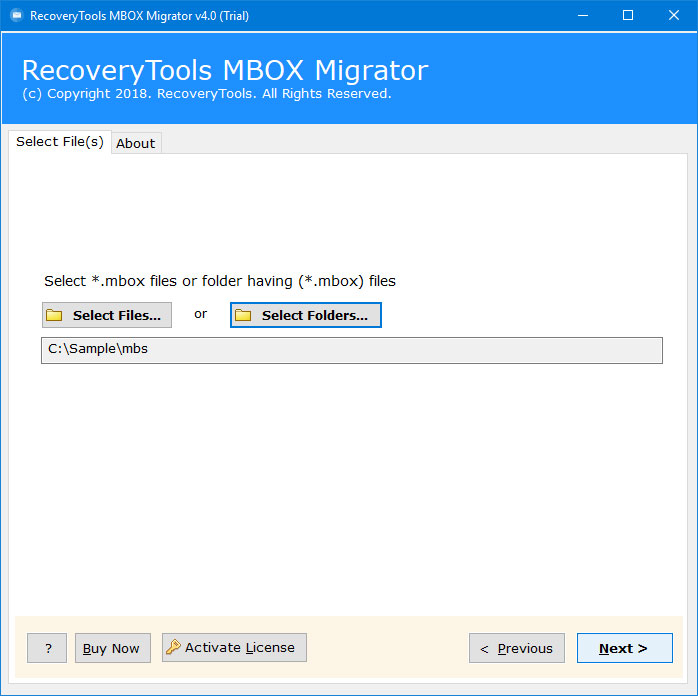
Run Opera Mail Converter
Install and run Opera Migrator and choose the files or folder that contain MBS files.

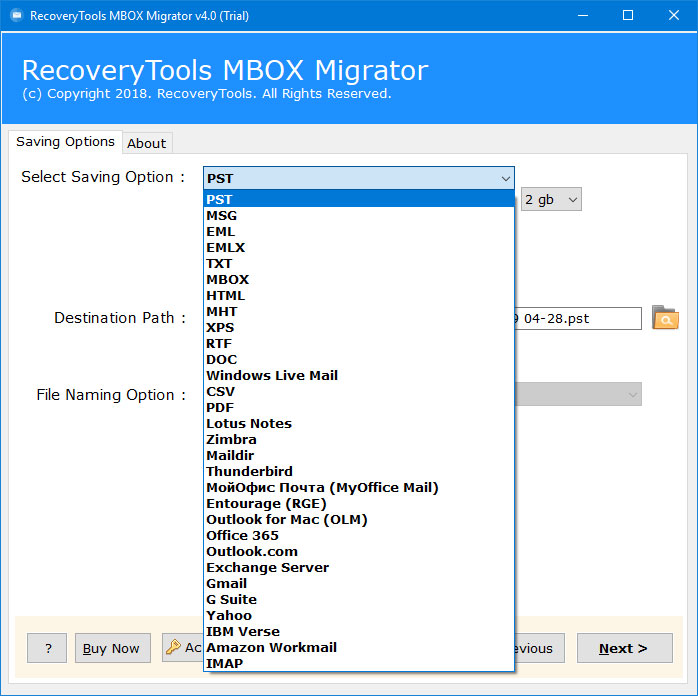
Select Opera Saving Options
Select the saving format and the destination location for the files.

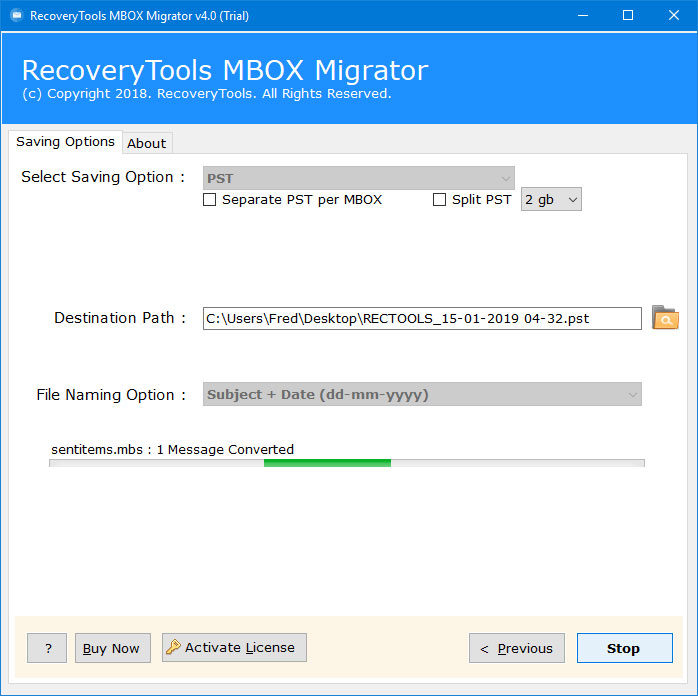
Start Opera MBS Conversion
The software shows the live conversion status. Then open the destination folder.
Different File Formats of Opera Mail Converter Tool

PST

EMLX

MBOX

RTF

XPS

MHT

Gmail

Lotus Notes

Google Workspace

IBM Verse
Know the Benefits of the Opera Mail Converter Utility

Convert Opera Emails to Useful File Formats
With the help of RecoveryTools Opera Mail Converter utility, one can easily convert Opera Mail to 30+ email & other file formats. Users can open MBS file emails on other platforms by changing them to these formats. Use this tool to back up Opera Mail emails in popular file formats.

This Opera Mail Converter lets users move Opera MBS emails to email clients that support MBOX files. You can convert MBS files to MBOX to import Opera emails into Thunderbird, Entourage, Netscape Mail, Spicebird, Turnpike, Berkeley Mail, EarthLink, The Bat!, etc.

This utility lets users convert Opera emails to 30+ file formats, for example MSG for Outlook or EML and EMLX. The demo version migrates the first 25 emails from each folder of Opera Mail MBS files.

This utility can export all MBS file emails to text files quickly. Opera Mail Converter creates a separate TXT or RTF file for each Opera Mail email.

This software provides 10+ file naming conventions to change the names of the files after the conversion of Opera MBS files. This works when you convert Opera Mail to TXT, HTML, MHT, XPS, RTF or DOC files. The naming formats are combinations of Subject, From and Date.

If you want to share Opera Mail emails with a partner or senior, or review them for legal work, convert them to DOC for Microsoft Word. Word files keep the email content and formatting intact.

Sometimes a user gets MBS files from a colleague and wants to read them. MBS files open only in the Opera Mail client, which needs an Opera Mail account. With this tool, you can convert Opera emails to separate RTF files and open them in WordPad without Opera Mail.

You can also save Opera Mail emails as web pages. Then you can open them as .mht or .html files in web browsers like Google Chrome, Microsoft Edge, Mozilla Firefox, Opera, etc.

The software gives two ways to load .mbs files, so it supports both selective and batch conversion. Choose Select Files to load selected MBS files, or Select Folders to load all MBS files in a folder and its subfolders.

The software converts all .mbs file emails with their components. Opera Mail emails may contain attachments and other embedded files, and the software keeps all of them during the migration.

When you save every Opera Mail email as a separate file like PDF, DOC, MSG, RTF, XPS or EML, the tool lets you pick a naming format for these files. This helps you manage many files quickly.
Demo Limitations & Pre-Requisites of Opera Mail Converter
Trial Limitations
The Demo Edition converts 25 items from each folder of the selected MBS files.
System Specifications
Hard Disk Space
Minimum 100 MB Space
RAM
2 GB RAM
Processor
Intel® Pentium 1.1 GHz processor
Operating System
Electronic Delivery
RecoveryTools Opera Mail Converter Tool will be delivered automatically. After your payment is confirmed, you will receive an email with a link to download the product and the activation key.
Frequently Asked Questions
Follow these steps to learn Opera Mail Migration process:
You can browse to the default location of Opera Mail mailbox to locate the .mbs files i.e.
C:\Users\UserName\AppData\Local\Opera Mail\Opera Mail\mail
Yes, the Opera Mail Migrator works on all Windows versions, including Windows 11 and 10 (32-bit and 64-bit).
Yes, the software keeps the internal folder hierarchy and the integrity of all items. Items in MBS folders like Inbox, Sent, Trash, Drafts, etc. stay in their original state after the conversion.
Opera Mail Converter Tool - DEMO and Licensed Version
 Download
  Buy
Buy At last, I came across a great technology that can export emails from Opera Mail to Outlook and Thunderbird programs simultaneously. Thanks to the developers of this Opera Mail converter that let me move Opera MBS files to Office 365.


Brian-o-Tarth, Peru
Thanks to the developers of this opera mail converter that allows me to use opera mbs files for Office 365 migration and solve queries like opera mail export or connect Opera Mail all email items to the Microsoft exchange server.

Yakinan, Yekaterinburg


 Support
  Blog
Blog  +1 7025533020