

Screens

Video

Guide
Top Rated XLS to CSV File Converter Tool to Convert Single or Bulk Excel files to CSV Format – No Technical Hassles
 100% Safe and Secure
  30 Days Money Back*
  Privacy Policy
Excel to CSV Converter is an ideal application to batch convert XLS to CSV format with all data fields.
The best thing about the XLSX to CSV conversion tool is that it allows users to export multiple excel sheets to single CSV file. Users are free to convert Excel file to standard comma separated file that can be accessible on multiple platforms.

Protect Users Data Privacy
XLS to CSV converter protects the data privacy during the conversion process. No information will be saved in any of our databases while converting converting multiple Excel sheets to CSV files. The tool works completely in a self-contained environment, so no information will be transmitted to our servers during the procedure.
Export All Fields to CSV
The Excel to CSV Converter keep the formatting intact, and deliver data with same fields including first name, middle name, last name, gender, title, birthday, suffix, language, initials, anniversary, notes, location, etc. User can easily convert XLS to CSV with all mapping fields without any worry

Convert with Original Quality
Easily save multiple Excel sheets as CSV file keeping original values. The Excel to CSV Converter will prevent your data from all type of loss during the conversion process. The output CSV files have a universal encoding that can be used at numerous application including Google Sheets, Zoho Sheets, etc.
Step-by-Step Process to Convert XLSX Files to CSV with Excel to CSV Converter
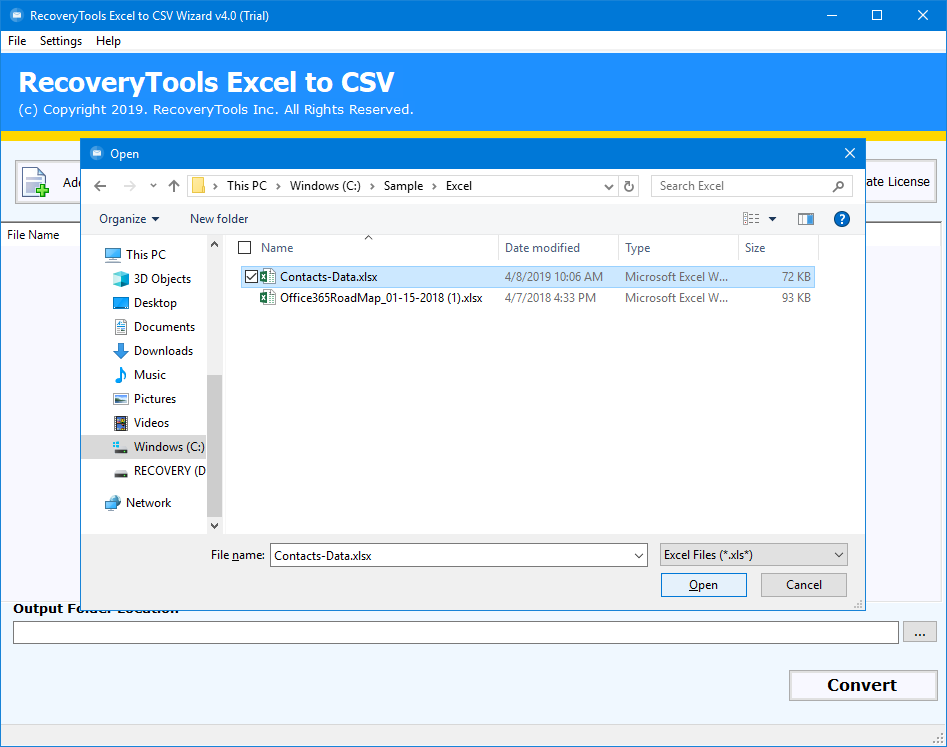
RecoveryTools XLSX to CSV File Converter easily exports all details from Excel workbook or template to CSV (comma-separated) format. An online tool provides free Excel to CSV conversion, but there is no guarantee of data privacy. This application is ideal solution for every user who wants to convert XLS to CSV format with high quality. Download free demo edition & follow 5 steps to convert XLS files into CSV format.
Explore Amazing Qualities of this Automated Software

Convert XLSX to CSV with all Details
The XLSX to CSV Converter allows users to export multiple excel sheets to single CSV file with all the details. All fields in the Excel file, including first name (full name), title, middle name, suffix, first name, last name (surname), e-mail display name, birthday, gender, department, etc. remain intact throughout the process.

Export Excel Data without Dependency
The XLS to CSV converter enables the users to successfully export Excel data files to CSV format without installing Microsoft Excel or any other application. The software is designed to work independently, and doesn't require any external support to convert Excel to CSV format.

Batch Export Multiple XLS to CSV Files
With the help of this software solution, users can batch convert excel to CSV format with a lot of advance features. The toolkit offers an individual option to combine and convert XLS to CSV format with all details. The program can read both old XLS files & new XLSX files in its panel & then export these files into CSV Comma Delimited Values.

Export XLS to Comma Delimited Files
The software enable the users to convert XLSX to CSV file. The CSV file keeps the data in Comma Delimited files which stores all of its data to a separate line in the table. The values of these columns are separated by a delimiter, most often a comma. The software is self-capable to convert multiple excel sheets to CSV without any error.

Works on Windows Operating System
Excel to CSV Wizard is fully compatible with all Windows OS editions. Users can export bulk of contacts from XLS, XLSX to CSV files. It is a completely standalone application to convert multiple excel sheets to CSV format. This tool can be run on all latest versions of Microsoft Windows i.e. Windows 11, 10, 8 32-bit & 64-bit OS editions.

Convert Excel to CSV UTF-8 Encoded File
Users can easily create CSV files with UTF-8 encoding. However, converting encoding of CSV files can be changed very easily by using Notepad. CSV files with UTF-8 encoding are one of the very common CSV file encoding as any user can successfully import resultant CSV file at multiple platforms.

Create Single CSV File for All Sheet
While using this solution, users can avail multiple advanced features, the automated solution allows to combine multiple Excel tabs to a single CSV file. The software holds the data integrity intact, and doesn't over lap the data fields. Users can easily convert Excel to CSV without any limitation of number of tabs.

Preserves Data Integrity
XLS to CSV File Converter ensures users to sustain and protect data information like folder hierarchy and folder hierarchy during and after the conversion is completed. Moreover, the solution provide 100% accuracy and safety since the tool completely works in offline mode, keeping malware threats and bugs away from data.
Easy Video Tutorial to Learn How Software Works!
Check Out the System Requirements to Avail Amazing Features of the Tool
System Specifications
Hard Disk Space
150 MB
RAM
2 GB RAM
Processor
Intel® Pentium 1 GHz processor (2.4 GHz is recommended)
Supported Editions
Electronic Delivery
RecoveryTools Excel to CSV Converter Tool will be delivered automatically. After your payment is confirmed, you will receive an email with a link to download the product and the activation key.
Frequently Asked Queries
Follow the steps mentioned below to Convert Excel to CSV
The XLS to CSV Converter software will generate a UTF-8 encoded CSV file. This file can be imported into all latest Address Book applications.
No, the XLSX to CSV Converter is a completely a standalone application, and does not require any external supportive application to execute the conversion process.
Yes, the demo edition of toolkit works similar to the pro edition of toolkit. In trail version you can check software functionality, and can export 10 entries for free.
XLS is the default file format from Excel 97 to Excel 2003, while XLSX is the default file format for Excel 2007 and later.
Potential Customer Reviews
"I have multiple Excel Workbook stored in my local storage, and I want to convert Excel to CSV without making any loss in its information. I like to say Thanks to the developers of this single panel Excel to CSV Wizard which enables me to convert multiple excel sheets to CSV in batch. I will give 8.5 ratings out of 10 for this amazing utility."


Mr. Dorian, Chine
"I can say that it is one of the best Excel to CSV Converter software. It preserved my original properties of Excel files while converting them to CSV files."

Mr. Achille, UK
"I want to merge multiple excel files to CSV format. The real problem I faced while doing so is CSV is a single page file, and Microsoft Excel don't provide any functionality to do it. One of my friends suggested me this XLS to CSV Converter tool which provides a direct option to do so. Great Software with an active support."
Mr. Mathéo, Germany

 Support
  Blog
Blog  +1 7025533020
 Download Now
  Purchase Now


