Skip to download
RecoveryTools

RecoveryTools · Secure cross-tenant migration for IT admins

Tenant to Tenant Migration Tool

Securely migrate Exchange Online mailboxes, SharePoint sites and Teams channels into a new tenant, with emails, calendars, files and permissions intact. The source tenant is only ever read.

No credit card, no scripts, no sign-up. Pick your tool and pilot it on one mailbox, site or channel.

Talk to Migration Experts

What The Tenant To Tenant Migration Tool Does

Support And Licensing At A Glance

What Is Tenant To Tenant Migration

Two Tenants, One Deadline

An Office 365 tenant to tenant migration moves users and their content out of one Microsoft 365 tenant and into another. The reason is almost always a change in the company itself.

Nothing Crosses Tenants By Itself

A target tenant runs its own directory. Accounts, groups and permissions all exist under different identities, so nothing follows content across automatically. Every user has to be mapped, and every permission set recreated on the other side. That is where data loss creeps into a project that otherwise looked simple.
Microsoft Covers Part Of It

Microsoft ships SPMT, Migration Manager and a cross-tenant shared data route, but each covers some workloads and leaves others out, and what is included shifts with your licensing. Most projects find the gap sits exactly where the collaboration content lives, which is where a dedicated tool earns its place.

Somebody Else Set The Deadline

An acquisition closes on a date somebody else agreed. A divestiture has a legal separation day. That is why the work runs in waves, meaning one department or one batch of sites at a time with a pilot first. It is also why one last pass before cutover moves only what changed.

Office 365 and Microsoft 365 are one platform under two names, so a tenant provisioned under the older licensing migrates exactly the same way.

Trusted by Microsoft Certified Partners

Microsoft® Certified Partners Rely On Our Tools

IT teams, enterprise administrators and managed service providers who hold Microsoft Partner status use this cross-tenant migration tool for clients every time an acquisition closes. They come back because it is secure by design and nothing at source is ever touched.

Read partner stories

Inside The Tenant To Tenant Migration Tool

Wave By Wave, Screen By Screen

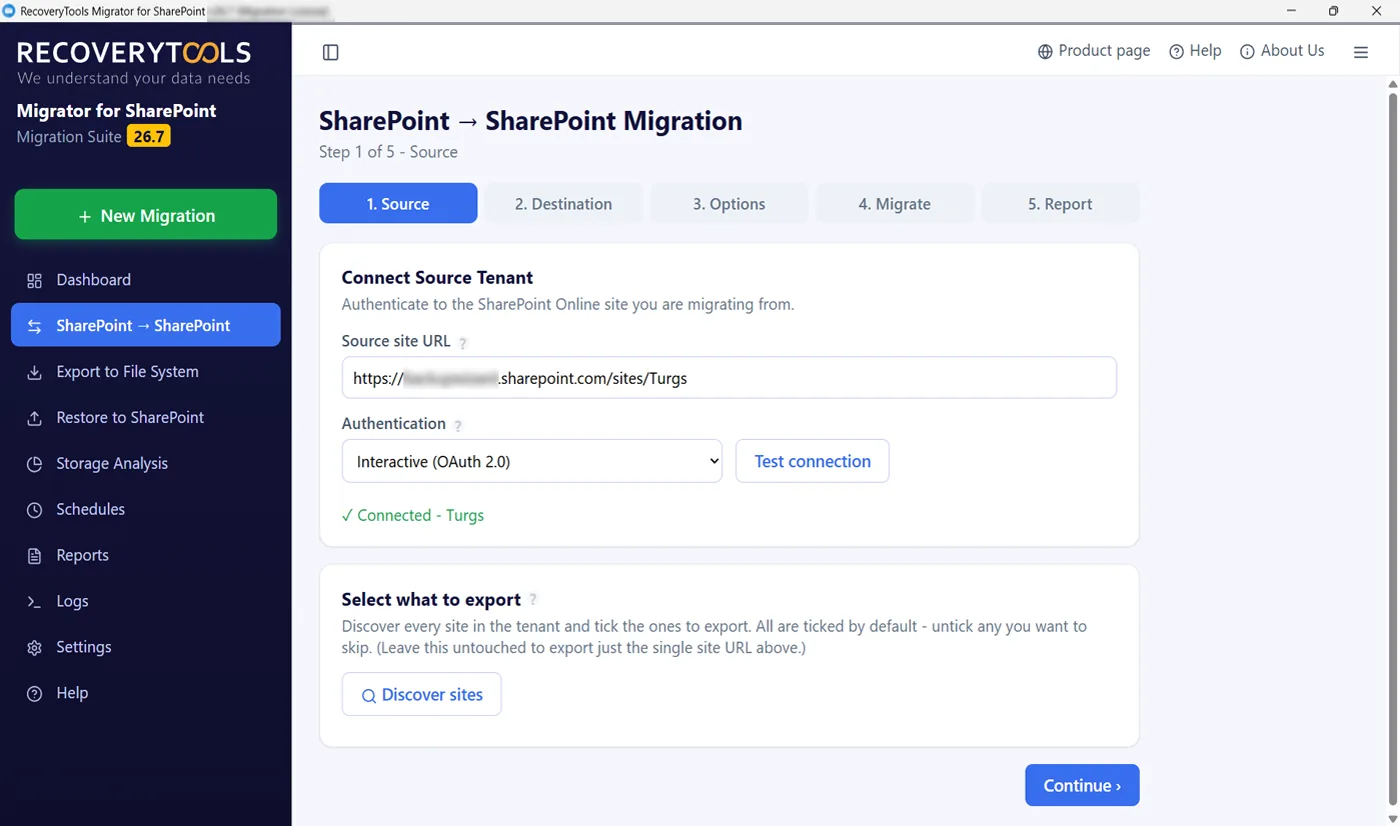
Tenant to tenant migration tool connecting source and destination over OAuth 2.0

Connect Both Tenants

Source Tenant And Destination, Signed In Separately

Each tenant is authenticated on its own with interactive OAuth 2.0, so your multi-factor and conditional access policy governs both. Sign-in is kept per tenant, which means switching between source and destination never crosses credentials.

  • Interactive OAuth 2.0 against each tenant in turn
  • Credentials stay separate, so both tenants stay apart
  • Admin access when the move covers other people's content
  • App-only sign-in by secret or certificate for unattended runs
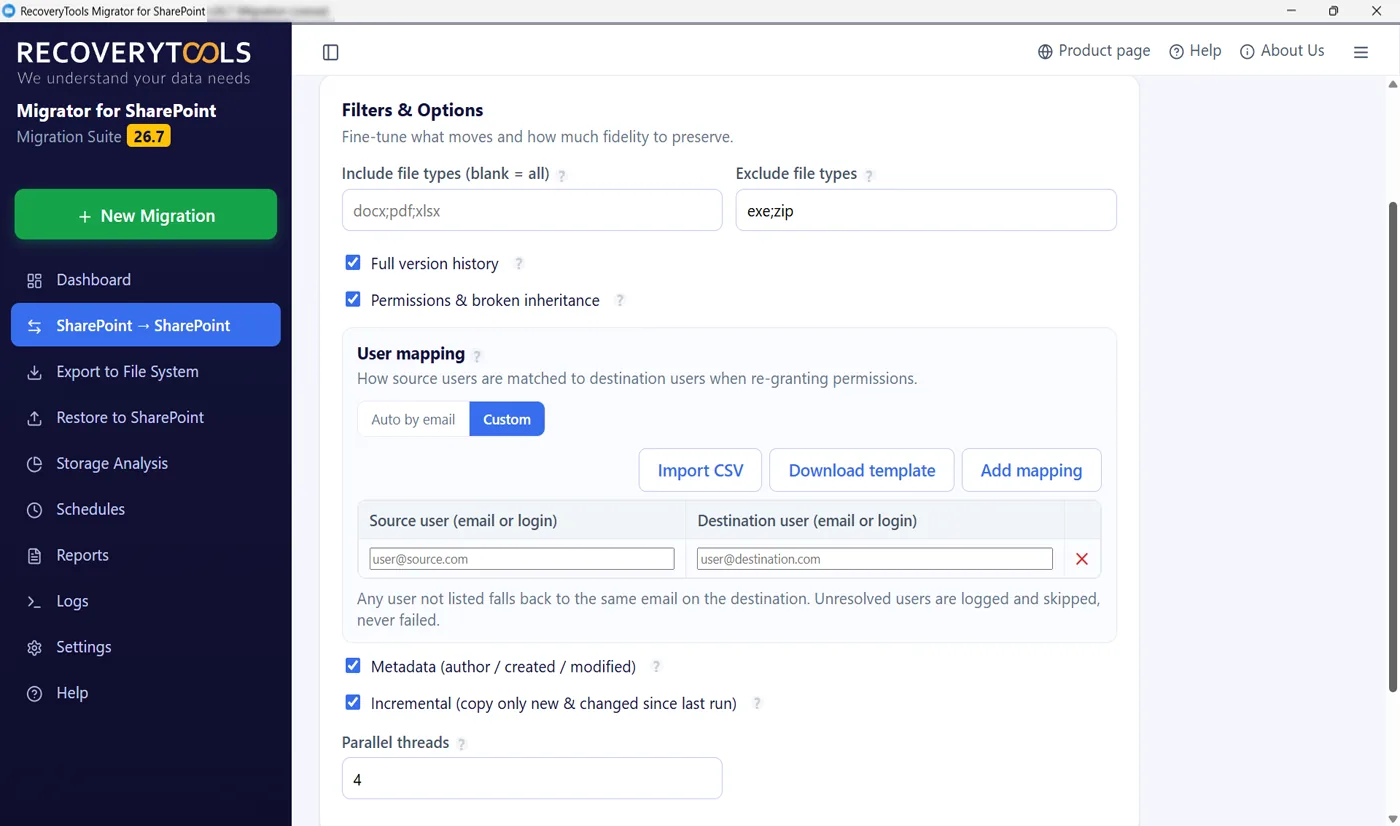
Tenant migration tool user mapping loaded from a CSV

Map Users Between Tenants First

Identities Do Not Match Across Tenants

One person is a different account in each directory. Automatic mapping matches by sign-in address where addresses line up. Where they do not, which is most acquisitions, load a CSV and map them by hand.

  • Automatic mapping by sign-in address
  • Custom mapping by hand or from a CSV when domains differ
  • Site mapping sends a source site to a different destination site
  • Content lands under the right owner rather than whoever ran the job
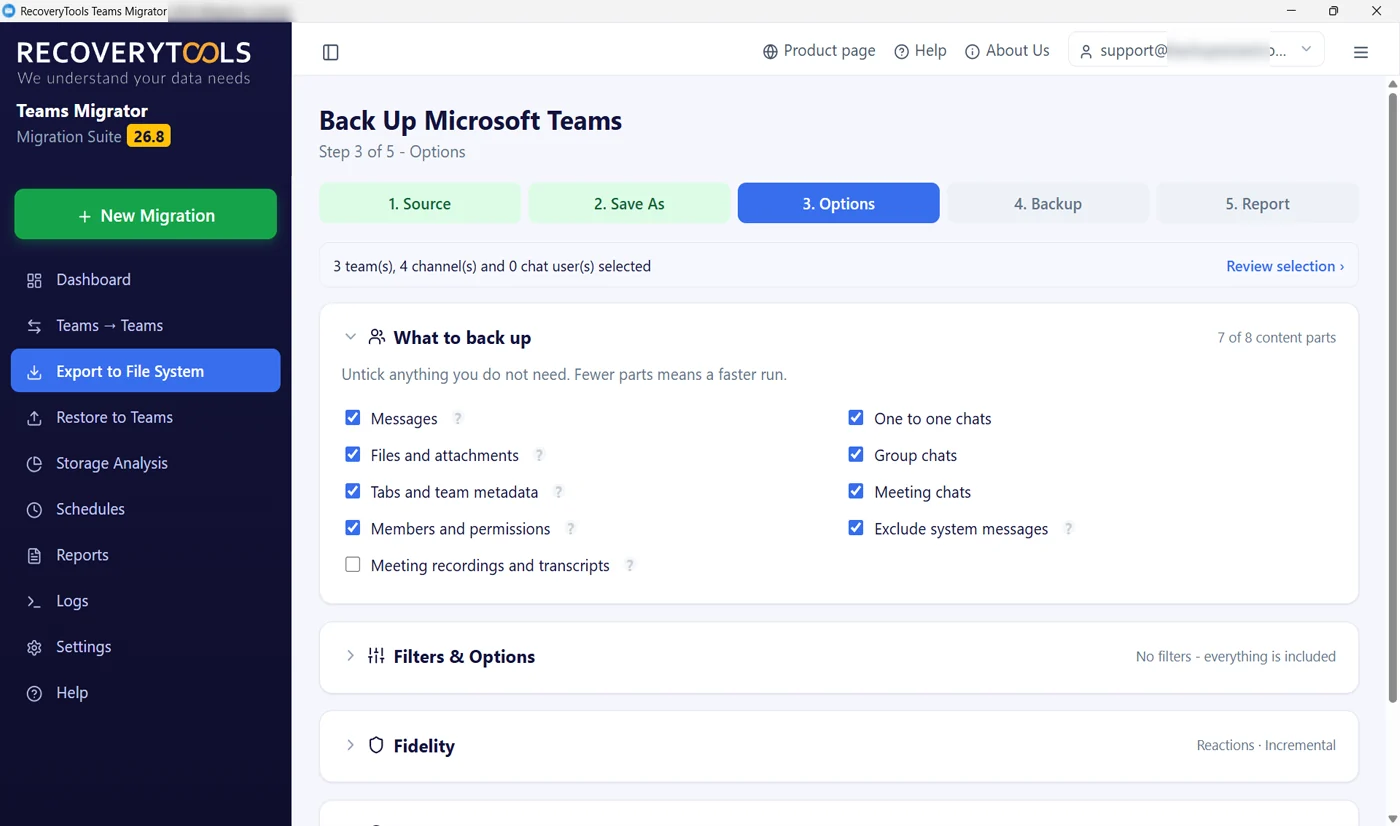
Tenant to tenant migration tool selecting content for a wave

Choose What Migrates In Each Batch

In Batches, Not All At Once

A tenant migration is rarely one run. Pick the workload, pick the users or sites in this batch, and leave the rest for the next one. A date range filter, file extension and file size filters narrow it further before anything is written.

  • Select mailboxes, sites, libraries or channels per batch
  • Filters for dates, extensions and sizes on every job
  • Run a pilot on one site or one channel first
  • Up to three jobs at once on the SharePoint side
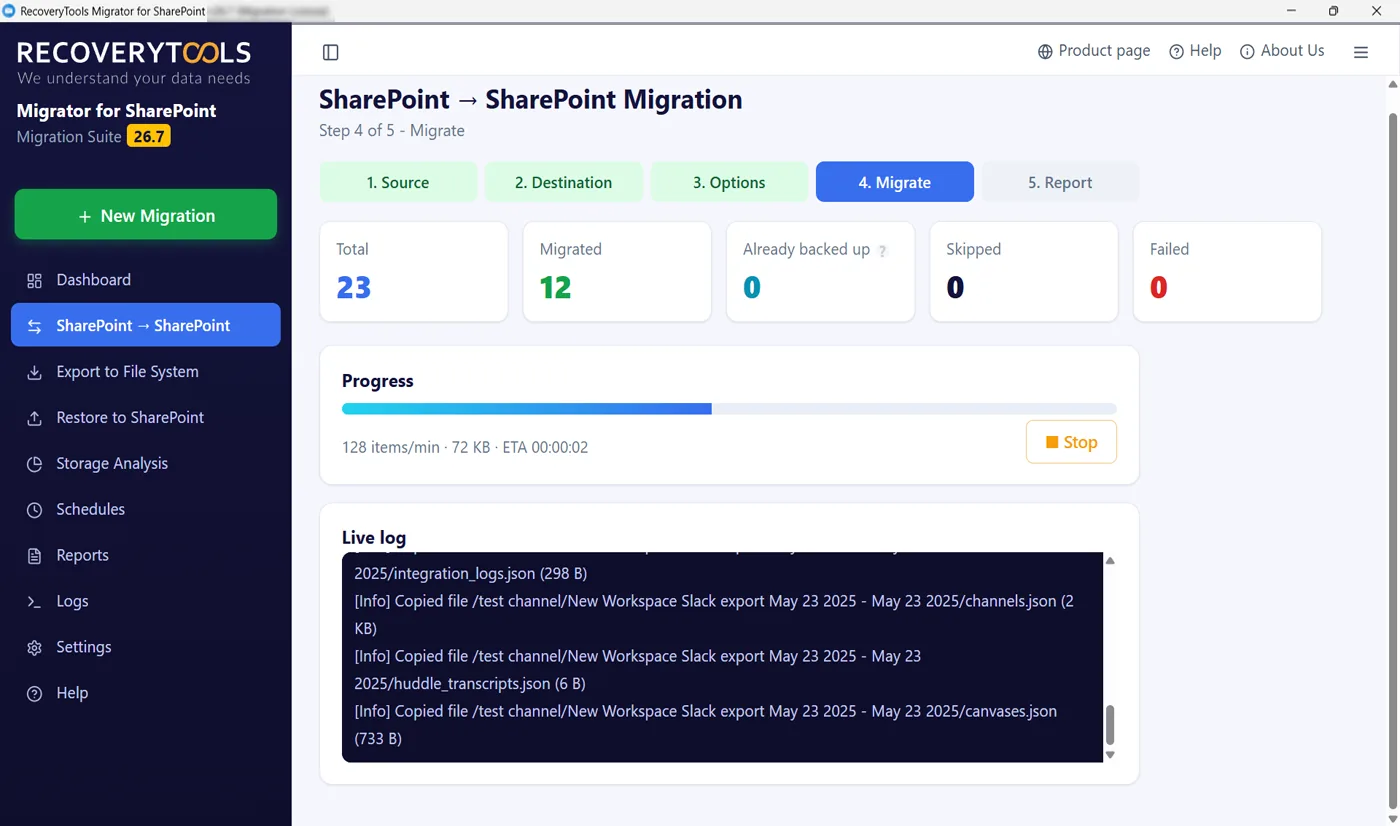
Cross-tenant migration tool running with live counters

Run The Migration With Real-Time Monitoring

Live Monitoring While The Batch Moves

Every job reports its progress on a centralized dashboard while it works. Counters for total, moved, already there, skipped and failed, migration status, throughput and activity logs naming each item. API throttling is handled by a retry queue so M365 never stalls the run.

  • Live counters, migration status and activity logs, per job
  • Throttle-aware parallel transfers, four workers by default
  • Large files resume in chunks after a dropped connection
  • Error tracking with a retry queue, so a failed item never fails the run
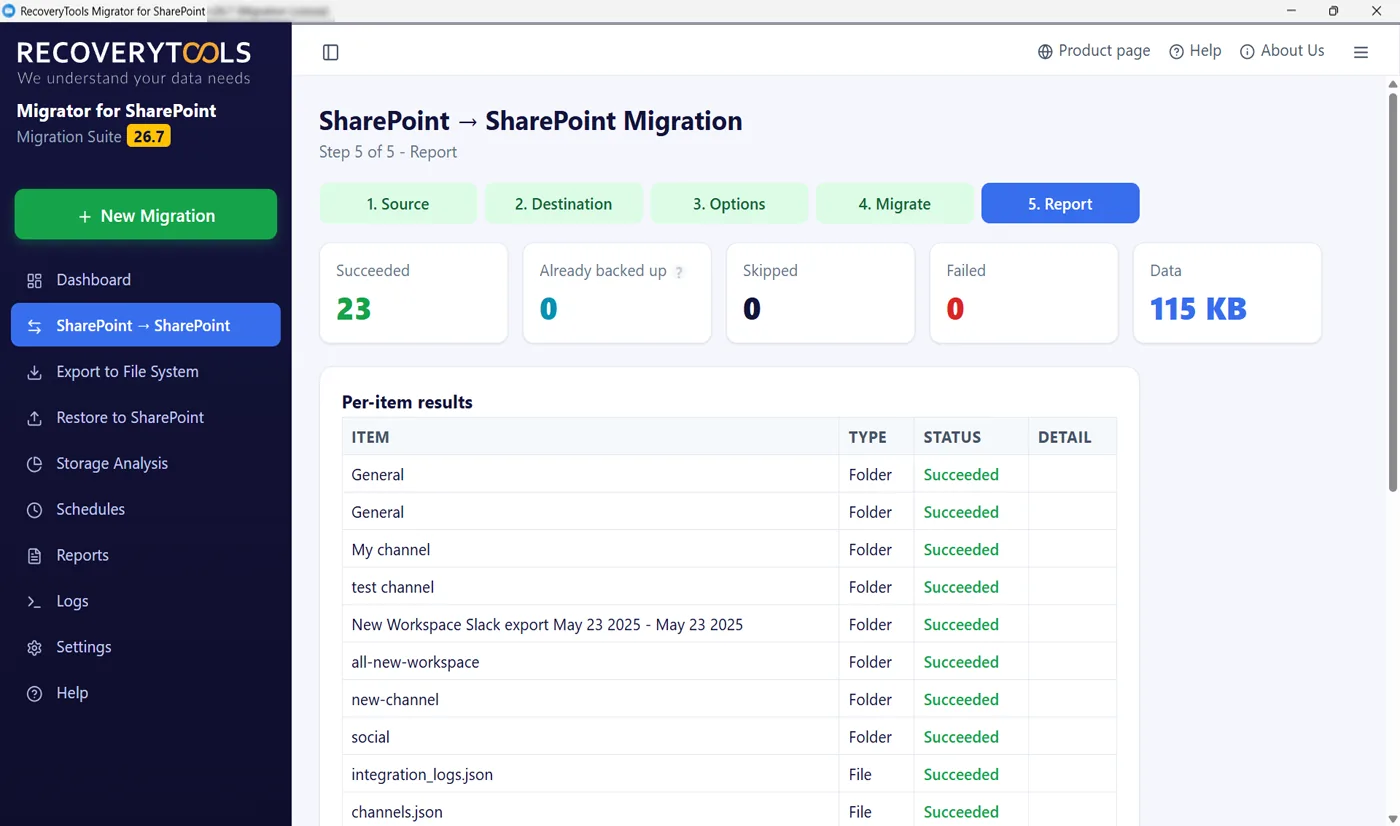
Tenant migration tool report with per-item status

Migration Reports That Prove The Wave Landed

A Report For Every Run, Not A Recollection

Detailed migration reports and activity logs land in your Documents folder for every run, three files each. Both organisation names sit at the top of each. Every item carries a status of copied, already migrated, excluded or failed, alongside its reason.

  • HTML to read, CSV to sort, plain text to search
  • Source and destination names recorded on every report
  • Per-item status with the reason attached to each failure
  • Failed items copied out to a Desktop folder for review
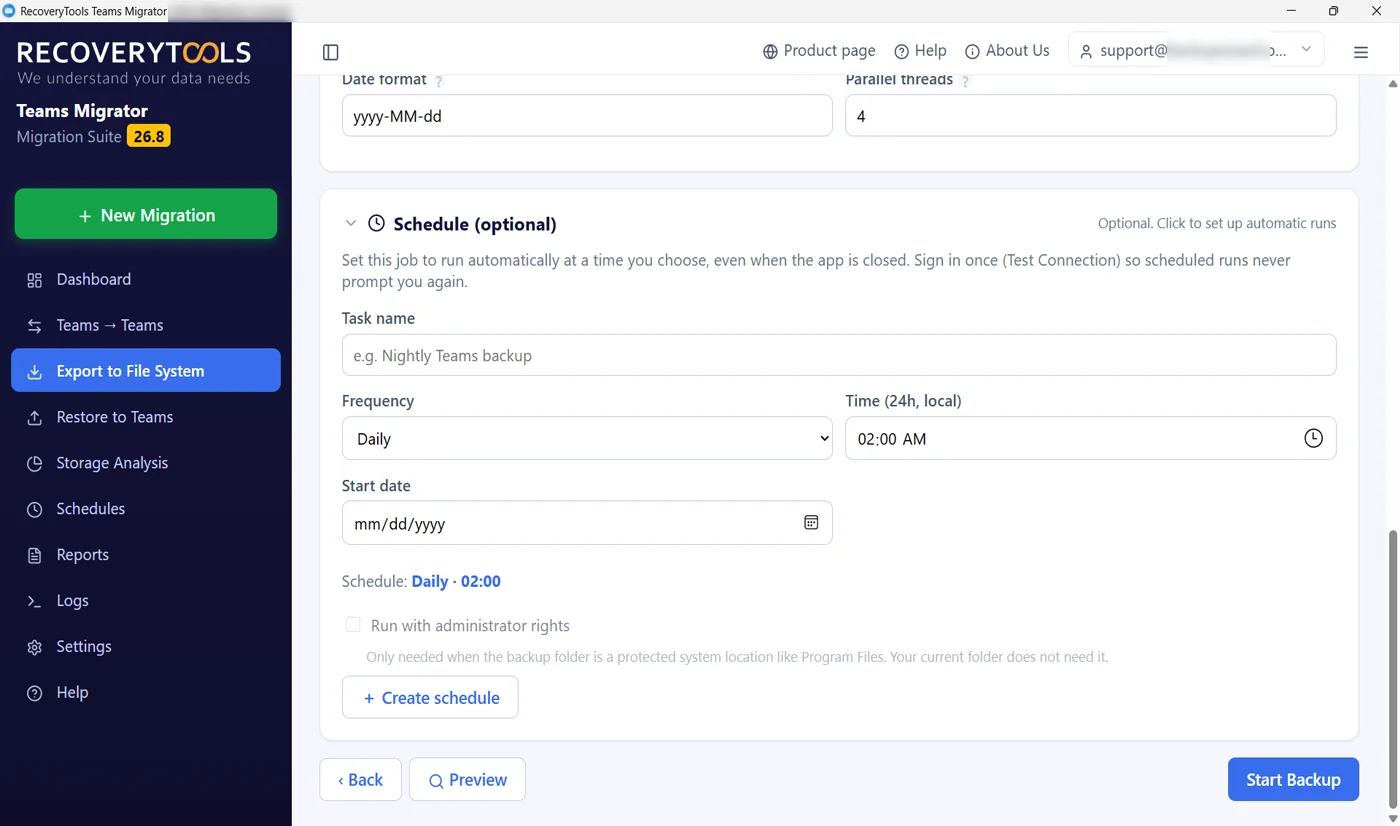
Tenant migration tool scheduling the delta pass before cutover

Delta Pass, Then Cutover

One Last Migration Sweep Before You Switch

Incremental is what keeps cutover short. Send the weight of a wave across midweek, then let a final sweep on the night itself carry only the changes. Schedule it once, daily, weekly or monthly and it fires with the application shut.

  • Incremental moves only what is new since the last pass
  • Anything already sitting at destination is counted, not copied twice
  • Schedule the final pass so nobody has to sit up for it
  • Your source tenant is still intact if cutover has to wait

M365 Workloads Migrated Between Tenants

What Actually Arrives On The Other Side

Moving the content is the easy half. These are the things that decide whether people can still work on the morning after cutover.

OneDrive and Intune are not covered here. Neither is Teams chat, because Microsoft’s chat import interface has not left beta and no tool can write chats into another tenant yet.

Cross-Tenant Migration Tool Features

Where A Tenant Migration Usually Hurts

Built for IT administrators, IT professionals, technicians and consultants running enterprise-level migrations. Data loss, downtime and disruption to business continuity are what keep an admin awake, and all three trace back to three mistakes.

Your Source Tenant Is Only Read

Safe by design. Sources are opened read-only and the tool never writes back to them. Nothing is deleted, nothing is moved out. If cutover is postponed or reversed, the original tenant is exactly as it was.

Automated User Mapping That Matches Reality

Accurate mapping of users and mailboxes, automated by sign-in address wherever the domains line up. After an acquisition they rarely do, so map by hand or load a CSV. Site mapping sends a source site somewhere with a different URL entirely.

Incremental Migration, Skip Previously Migrated

Incremental migration transfers only new or modified items and skips previously migrated data. Send the bulk across midweek, then a short pass on the day carries only what changed. A repeat run never creates a duplicate.

Validate Before It Writes To The Tenant

On the Teams side a migration stays in validate-only mode until you switch it off, listing every name with no match at destination. On the SharePoint side discovery lists what each account can actually reach before the scope is agreed.

Bulk Migration, Waves That Run Side By Side

Bulk migration moves multiple users and sites in a single operation. Up to three SharePoint jobs at once, each with its own dashboard card and report. The app warns you if two jobs would overlap and refuses to start an identical one twice.

Tenant Migration Without PowerShell

Both tenant migration tools are point and click. There is no script to write, no script to hand over and no script that stops working when somebody changes a permission six months from now.

Secure Authentication On Both Tenants

Secure OAuth 2.0 on every sign-in, so your MFA and conditional access rules stay in command. Data travels encrypted and we store no credentials, mailbox content or organizational data. Overnight runs use a secret or certificate against your own directory registration.

Per-Item Reporting Per Run

An HTML report, a CSV report and a plain-text log for every run, with source and destination named at the top. Every item carries copied, already migrated, excluded or failed. Failures carry their reason with them.

Scheduled Cutover Passes

Once, daily, weekly or monthly, running with the application closed. That is how the final delta pass happens the night before the switch without anybody sitting up to start it.

Trusted For Cross-Tenant Migration

Four Scenarios, One Method

A merger, a divestiture, a consolidation or a rebrand. Reasons change, the job does not: map the people, move it in stages, prove each one landed. Enterprise IT teams, administrators and the MSPs who work for them run M365 tenant to tenant migration identically at every scale, from forty users to thousands of users, through an admin-friendly interface that needs no training.

M365 Tenant Consolidation Scenarios

What You Get To Control

  • Merger And Acquisition Migration

    Two organisations become one, so two tenants have to become one as well.

  • Divestiture And Separation

    A subsidiary is sold as a spin-off, and business separation means its people take their content.

  • Tenant Consolidation

    Merge multiple tenants into one to centralize data and stop administration and licensing costs multiplying.

  • Corporate Rebranding Or Domain Restructuring

    A domain change, user relocation or a reorganisation, where everything moves under a new name.

How To Do A Tenant To Tenant Migration

Six Steps From Assessment To Cutover

This order keeps a live tenant working while everything moves. Skipping the pilot is how projects go wrong. For a worked example of one workload, read how to migrate a SharePoint site to another tenant.

  1. Connect Source And Destination Tenants

    Authenticate both tenants, then inventory what is actually there before agreeing to anything. Discovery lists the sites, teams and mailboxes each account can reach, which is how the scope becomes a number instead of a guess.

  2. Configure Migration Settings

    Planning splits everything by department, by workload or by whatever the business calendar allows. Decide the mapping rules now, and get destination sites, teams and channels created before anything is written.

  3. Map The Users

    Address matching handles the easy half on its own. Export whatever is left to a spreadsheet and pair those by hand. This step decides whether content arrives owned by the right person.

  4. Run A Pilot Migration

    One site, one team, a handful of mailboxes. Then go and look at it on arrival and check names and dates. Two minutes here costs far less than unpicking a full run afterwards.

  5. Start Migration And Track Progress

    Run the stages you planned, track progress on the dashboard and verify transferred data in the report at the end of each one. Failures carry their reason, so an identity that did not map gets fixed before the next wave rather than after cutover.

  6. Delta Pass And Cutover

    On the day, run a final delta pass with incremental on, a last synchronization sweep so only the changes move. Switch people over, and leave your source tenant standing for a month or two. It still holds everything, untouched.

Manual Migration vs A Tenant To Tenant Migration Tool

Scripting It Yourself

A small move can be done by hand. For an enterprise it turns error-prone and time-consuming the moment identities, permissions and a cutover date land in the same project.

PowerShell and native tooling
A tenant migration tool
Native tooling and complex configuration leave gaps nobody spots until later
Point and click, with no script to write or hand over
Every user has to be mapped by hand, one at a time
Automatic mapping by sign-in address, or a CSV for the rest
Timestamps, permissions and folder hierarchy drift out of shape
Metadata, permissions and hierarchy carried as they were
A second pass copies everything again
Incremental moves only what changed since the last one
No way to know what failed until somebody complains
Per-item report with a reason attached to every failure
Large moves tie up an engineer for weeks
Batches run in parallel and scheduled passes run unattended
Nothing to show an auditor afterwards
HTML and CSV reports kept for every run
A mistake means restoring from wherever you can
Your source tenant was only ever read, so it is still intact
Free Resource

A Tenant Migration Checklist

What to settle before the first batch moves. How to scope both tenants, how to agree the mapping rules, and what to check at destination before anyone is told to switch.

  • How to inventory both tenants before agreeing a timeline
  • Which questions to ask before mapping rules are signed off
  • What to verify at destination before the cutover call
Download the free checklist

PDF · no email required

Rather read it on the web? Work through the Microsoft 365 migration planning checklist.

Tenant To Tenant Migration Tool Specifications

Before You Install

Software

Version
26.8
Released
August 2026
Installer size
35 MB
Licence
$99 per machine, per year

Supported Platforms

Source
A Microsoft 365 tenant
Destination
Another M365 tenant
Authentication
Interactive OAuth 2.0, or app-only by secret or certificate
App registration
In your own Microsoft Entra directory, admin consent once
Security
Encrypted transfer, no data storage, no credentials retained, source opened read-only
Languages
Ten, including the built-in help
Workloads
Exchange Online mailboxes, SharePoint sites, Teams channels

System Requirements

Operating system
Windows 11, 10 and Windows Server · 32-bit or 64-bit
Processor
Intel Core i3 or equivalent, 2 GHz+
Memory
4 GB RAM minimum, 8 GB recommended
Disk
500 MB per installer, plus room for logs and reports
Runtime
.NET 8 Desktop Runtime and Edge WebView2

Tenant To Tenant Migration FAQs

What Admins Ask Before They Run It

What is a tenant to tenant migration?

It is the work of lifting people and everything they own out of one M365 organisation and settling them in a second one. Each tenant keeps its own directory, its own domains and its own licensing, which is precisely why nothing travels between two of them unaided. Acquisitions, sell-offs, consolidations and rebrands account for most projects. A tenant provisioned under the older Office 365 licensing migrates in exactly the same way.

Which Microsoft 365 workloads can move between tenants?

Exchange Online mailboxes with emails from every folder including custom ones, email attachments, calendar items, contacts and shared mailboxes. SharePoint Online sites with document library structure, lists, list items, file properties, permissions, version history and content types. Microsoft Teams with its teams, channels, team messages, replies, files and team members and owners. Each workload has its own installer, so you take the one the current stage needs rather than deploying everything at once.

What is not covered?

OneDrive and Intune are outside this, and so is device migration. Teams chat cannot move between tenants at all right now, and that is a platform limit rather than ours: Microsoft's chat import interface is still in beta, so no tool can write one to one or group chats into another organisation. Channel messages migrate normally. Workflows, custom code and third-party add-ins are configuration rather than content, so they are rebuilt at destination.

Can users keep working while the migration runs?

Yes, without downtime. Nothing is ever written back to the origin, so no one is locked out, productivity holds and no file disappears from under them halfway through. That is what lets the work run in stages: most of the content travels while people carry on as normal, and a brief final sweep on the day collects whatever moved in the meantime.

What happens if something goes wrong after cutover?

Your source tenant still holds everything. These tools copy rather than move destructively, so a bad cutover is a routing problem rather than a data problem. Point people back at source while the issue is fixed, then run another delta pass. Most projects keep a source tenant licensed for thirty to ninety days after the switch for exactly this reason.

How are users mapped between the two tenants?

Wherever the sign-in addresses line up it happens on its own, which covers the straightforward half. Acquisitions rarely leave the domains matching, so the remainder are paired manually or imported from a spreadsheet. SharePoint adds site mapping on top, letting a source site land at an address that bears no resemblance to the original.

What access do I need on each tenant?

Read rights where the content is now, write rights where it is going. Authentication is modern only, through an Entra registration you control, and the permissions it asks for want approving a single time. A person at the keyboard signs in interactively, which keeps your existing sign-in policy in command. Scheduled work swaps that for a secret or a certificate so nothing stops to prompt.

Is the tenant to tenant migration secure?

Yes. Authentication is secure OAuth 2.0 on both tenants, which keeps your MFA and access rules in force on every sign-in. Data travels encrypted from the source tenant to the destination and is never stored on our servers or anywhere else outside your two tenants. Client secrets are held encrypted for the Windows account that stored them. The source is opened read-only, so the migration cannot delete, alter or corrupt a single item at origin. That is what makes it safe to run against a live production tenant.

Do I need PowerShell for any of this?

No. Both tools are point and click from end to end. There is no script to write, none to hand over at the end of the project and none to maintain afterwards. That matters more than it sounds: a migration script tends to outlive the person who wrote it and stop working the first time somebody changes a permission.

How long does a cross-tenant migration take?

How many items there are matters far more than how many gigabytes, since throttling is applied per request. Raising the transfer threads and overlapping runs are the two levers you have. A believable plan starts with a pilot, works through departments over some weeks and keeps cutover itself brief.

What proof do I get that a wave landed?

Results land in your Documents folder in three forms, one to read, one to sort and one to search, each headed with both organisation names. Every item is marked as copied, already there, excluded or failed. Anything that failed says why. The failures themselves are copied to a Desktop folder, so you inspect the real items instead of reading about them.

Can I try it before committing to the project?

Yes, and it is the sensible order. Each tenant migration tool has a free demo version with every option live and only the item count held back, so you evaluate the full migration before purchasing. Send one site or one channel across, then go and look at what arrived: the names on it, the dates on it, who can open it. Ten minutes of that beats any amount of reading.

What does a tenant migration cost?

Each tenant to tenant migration tool is licensed per machine per year rather than per user or per gigabyte, which means a forty user move and a four thousand user move cost exactly alike. There is a thirty day money-back guarantee and 24/7 technical support. Talk to our migration experts for a quote on your workloads, and the installation guide and EULA are linked from every download.

Still Have A Question?

An engineer can look at both tenants with you and tell you honestly what will come across, what will not and which parts need doing by hand whichever tool you buy. Nothing passes through our servers at any point, which is usually what the GDPR questionnaire is asking about.

Talk to Migration Experts

Try The Secure Tenant Migration Tool On One Site First

A pilot costs nothing but an evening. Full detail on each workload lives on its own page: the Office 365 Migration Tool for mailboxes, the SharePoint Migration Tool for sites, libraries and lists, plus the Microsoft Teams Migration Tool for teams and channels.

Tenant MigrationFree trial · Windows
Trial Talk to Experts