Power The Recorder Down
Do this before anything else. Every minute the unit runs it writes over its oldest material, and that is the footage you are trying to get back.


DVR hard drive recovery for Windows. Pull deleted and lost CCTV footage off a recorder disk that will not mount, then save it as video anyone can play. No recorder needed.
Scan first, pay later. The full recovery runs without limits. Only saving a clip out of the tool is capped, so you see what survives before you spend anything.
A recovery tool has to recognise the layout before it can read a single frame. These are the recorder families the tool opens.
Five working screens from version 26.8, in the order a recovery runs. Each one exists to answer a question you have before you commit to the next step.
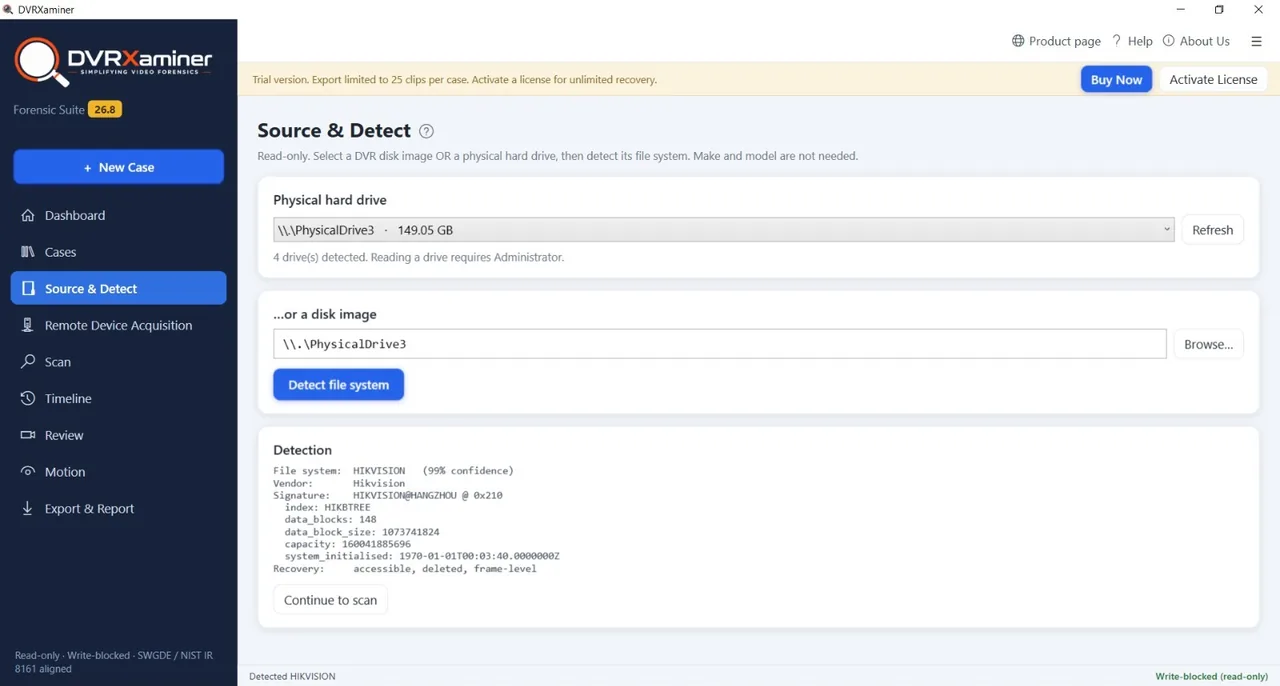
No make or model required
Detection reads the structures on the platters and names the vendor with a confidence score. It also reports what the recovery can reach on this disk: accessible recordings, deleted ones, and frame-level rebuilding. That answer arrives in moments, long before a full scan.
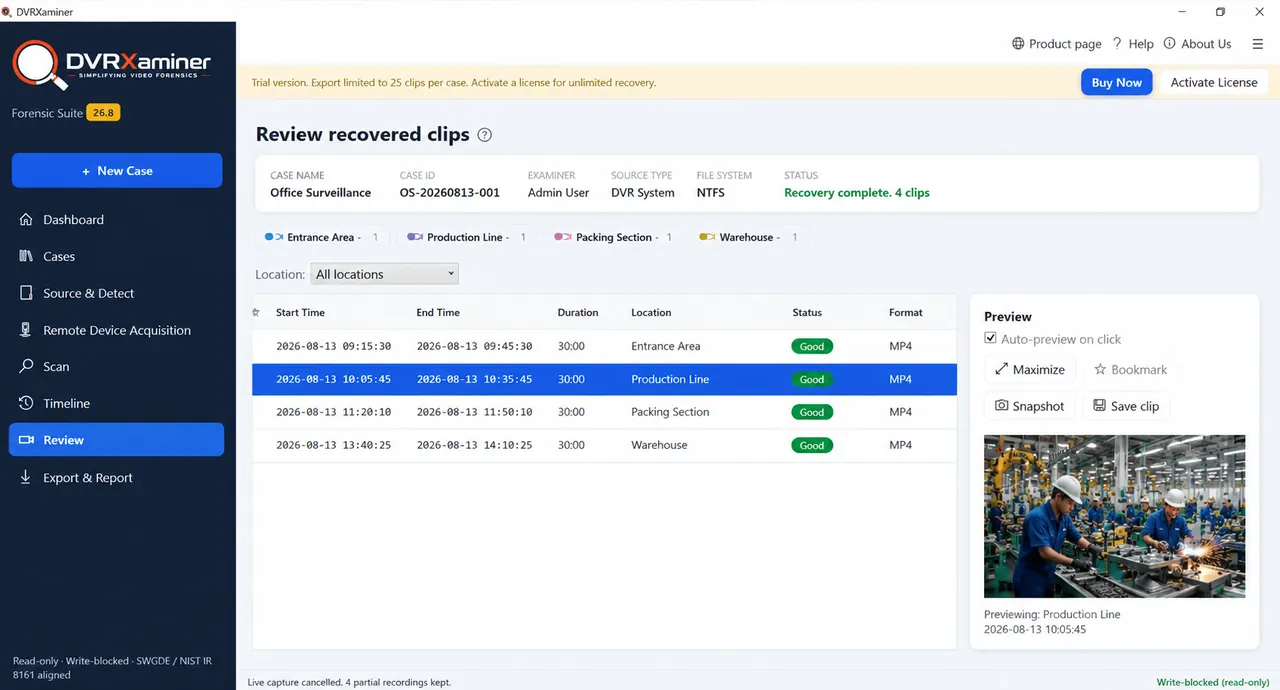
Recovery complete, every clip listed
Review lists what the scan found, one row per clip, with a start time, an end time, a duration, a location and a status. Each one plays in the preview pane at full length. You find out whether the footage you need survived before you spend anything.
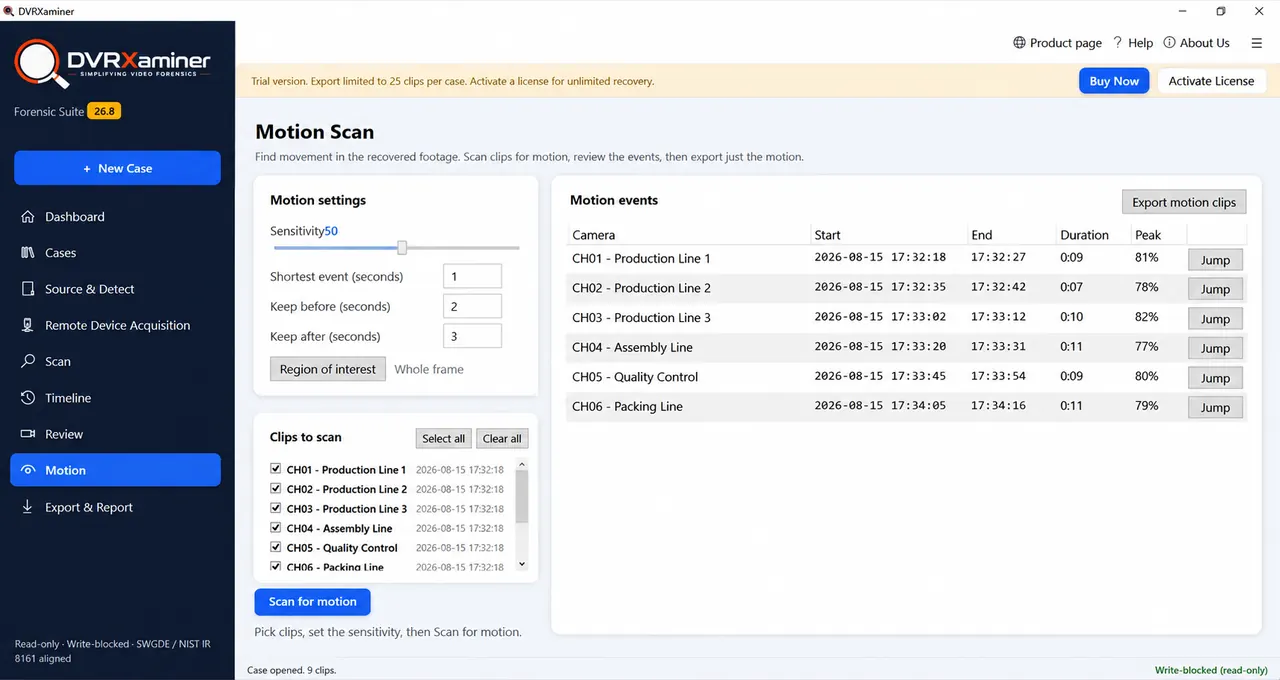
Weeks of footage down to the minutes that matter
A successful recovery often returns more than anyone wants to watch. Motion Scan reads the recovered clips and returns only the segments where something moved, each with a duration and a peak score, with a jump straight to the frame.
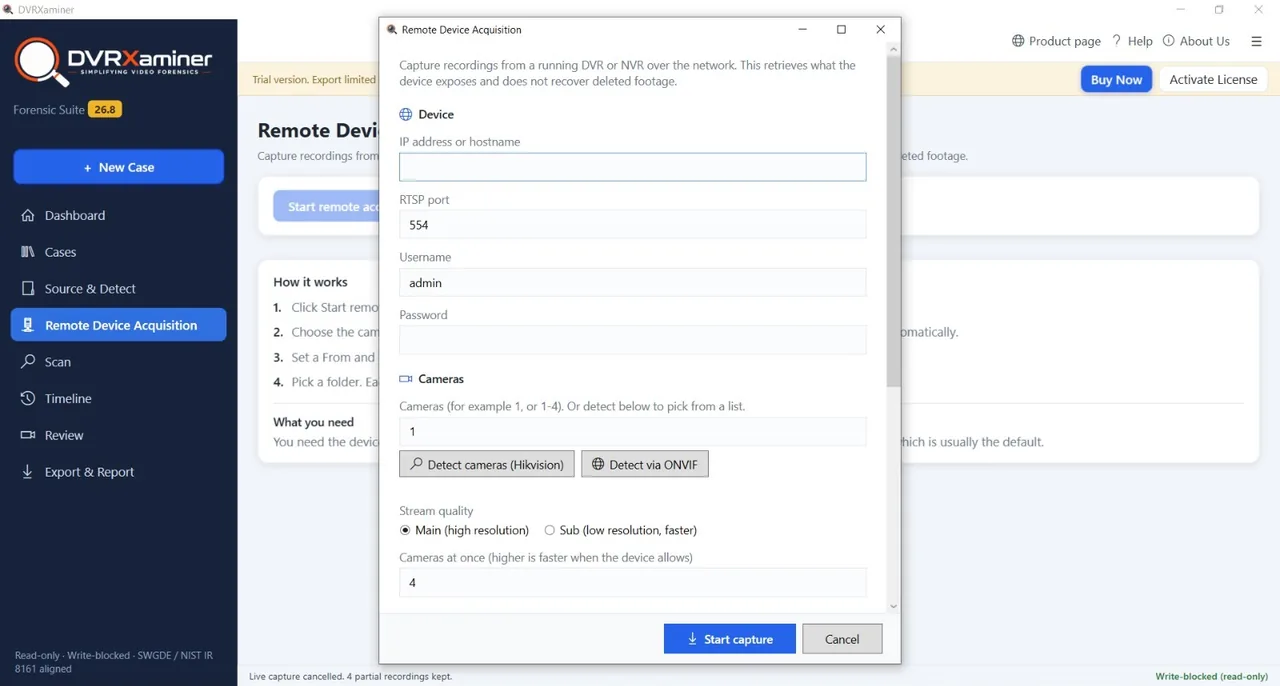
When the unit still runs and the disk stays in
Sometimes the recorder is healthy and only the export is the problem. Remote Device Acquisition connects across the network and captures recordings straight to a folder, between a from time and a to time, without unracking anything.
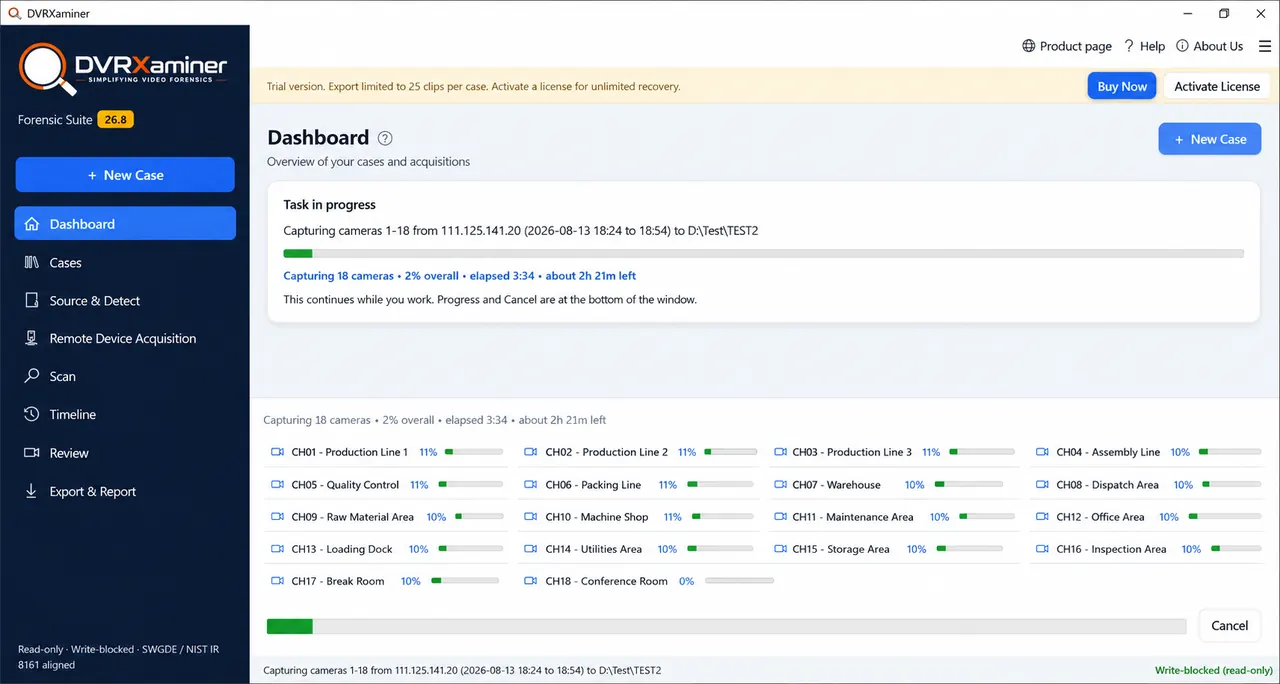
A long job that does not hold up the rest
Surveillance drives run to several terabytes, so a full pass takes hours. It runs in the background with a progress bar for each channel, an elapsed time and an estimate of what is left. Cancelling keeps every recording already written to disk.
The hardware inside a CCTV recorder is an ordinary SATA drive. What the unit writes onto it is not ordinary at all, and that mismatch is the whole reason a healthy disk looks blank on a computer.
If Windows raises a format prompt when you attach the drive, dismiss it. The disk is not blank and it is not broken. It is written in a layout File Explorer was never taught to read.
RecoveryTools, Built For Recovery Work
RecoveryTools has been building recovery and migration software since 2011. Watch a recovery run end to end, from attaching an unmountable disk through the scan and preview to the saved files.
Six steps from a disk Windows will not mount to files you can play. The first step matters more than the other five put together, because a recorder left running is overwriting the thing you are trying to save.
Do this before anything else. Every minute the unit runs it writes over its oldest material, and that is the footage you are trying to get back.
Connect the drive through a USB dock or an internal SATA port, then dismiss the Windows format prompt. A disk image loads in place of physical media.
Detection names the vendor with a confidence score and reports what the recovery can reach. This takes moments, so you know early whether to continue.
The scan reads past the channel index and reports deleted recordings alongside accessible ones. On a multi terabyte drive expect hours rather than minutes.
Every recovered clip plays in full inside the tool. Confirm the camera and the hour you actually need survived before you decide about a licence.
Pick a container and a destination folder on a different drive. Channel, camera name and recorded timestamp travel into every saved file.
Recovery software is sold on optimism more often than it should be. Here is the honest split, so you can work out which side your disk falls on before you download anything. Once the footage is off the disk and has to stand up as evidence, that becomes DVR forensics, which is a separate job.
If the drive clicks, grinds or never appears in Disk Management, stop powering it up and speak to a hardware recovery lab. Repeated power cycles on a failing drive make a lab job harder and sometimes impossible.
Hikvision units write WFS and Dahua units write DHFS. Some NVRs recording IP camera streams use no proprietary layout at all. Two units from the same maker can write differently after a firmware revision, so attach the drive in the free trial and read what Source and Detect reports.
The recovery itself runs without limits. Attach the drive, let it detect the layout, run the full scan and play any clip that came back, end to end. The cap only applies at the point a clip leaves the tool, which means you know what survived before you spend anything.
What comes back, what does not, and what to do in the first hour.
Often yes, as long as the recorder has not written over it. A DVR deletes by marking a stretch of disk as free for reuse rather than by wiping it, so until the write head comes round to that stretch again the frames are still there. The software scans past the channel index and reports deleted recordings alongside accessible ones. The single biggest factor is how long the unit kept running after the footage was lost.
No. Once the recorder has written new frames over that part of the disk the old frames are gone, and no software recovers them. This is worth being blunt about because a DVR is a ring buffer that overwrites its oldest material continuously, so a unit left running is destroying the thing you want. Power the recorder down and pull the disk, and do it as early as you can.
No. A drive with a seized motor, failed heads or damaged platters needs a hardware lab with a cleanroom, and no software can substitute for that. The software works on drives that still read, which covers the common cases: a disk Windows calls raw or unallocated, a formatted disk, a damaged channel index, or footage deleted from a healthy drive. If the drive clicks, grinds or never appears in Disk Management, stop powering it and speak to a recovery lab.
Dismiss the dialog and do not format. Windows raises it because the drive carries a recorder layout it does not recognise, not because the disk is empty or broken. Accepting the offer writes a fresh filesystem across the platters and destroys the channel index, which is the map of which camera occupied which stretch of disk at which time. Attach the drive and open it in Source and Detect instead.
Usually some of it. Formatting normally writes a small amount of filesystem structure at the start of the disk rather than clearing the whole surface, so recordings further in survive. The channel index is often the casualty, which means clip boundaries and clock times may be incomplete. Frame-level recovery reassembles clips from the frames themselves in that situation. The free scan tells you how much came back before you decide anything.
Coverage includes Hikvision, Dahua, CP Plus, Bosch, Honeywell, HiFocus, Sony, Uniview, Prama, Swann, Lorex, Sparsh, Night Owl, Qubo, Godrej, Zmodo, Zicom, TVT, Matrix and Truview. Hikvision units write WFS and Dahua units write DHFS, and some NVRs recording IP camera streams use no proprietary layout at all. Two units from the same maker can write differently after a firmware revision, so attach the drive in the free trial and read what Source and Detect reports.
No. The recordings sit on the platters rather than inside the unit, so a recorder that will not power up, that was damaged in a fire or a flood, or that was thrown out entirely makes no difference. An unknown admin password guards the recorder menu and its web console, and reading the disk on a computer goes through neither. All that is needed is the drive.
It depends on the size of the disk and how much of it holds recordings. Surveillance drives are commonly 1 TB to 8 TB and hold weeks of continuous footage across many channels, so a full pass is measured in hours rather than minutes. Detection itself is quick, and it runs first, so you know within moments whether the layout is recognised before committing to a long scan.
Scanning, listing and reviewing are unrestricted. You can run a full recovery on the real drive, see every clip that came back and preview each one at full length. The cap applies only when a clip leaves the tool. The trial exports 25 clips per case, and each saved clip is cut at the first 60 seconds by time rather than by file size, so the length is the same whatever the bitrate. A message after each trial save says the clip was limited to one minute. A licence removes both caps.
Tell us the recorder, the disk size and what happened to it. An engineer will tell you honestly whether a scan is worth running.

Detection, the full scan and preview cost nothing and write nothing. Attach the drive, see how much of the retention window came back, then decide whether it is worth a licence.
Version 26.8 · Windows 11, 10, 8.1, 7 and Server · 30 day money back
Recovery walkthrough
1 / 4 · scroll or drag sideways