Secure The Source
Attach the recorder disk, a card or a forensic image through a dock or an internal port. Reading a physical drive needs Administrator rights.


DVR forensics and CCTV forensics software for Windows. Examine the disk from a DVR, NVR or CCTV recorder, then extract the footage as evidence. No recorder needed.
No card, no sign-up. Scanning, listing and preview run without limits. Only saving a clip out of the tool is capped.
DVR forensics software has to recognise a layout before it can read anything. These are the recorder families DVRXaminer opens.
DVRXaminer is a DVR examiner, which means a tool for examining recorders rather than a general video editor. It opens the disk so you can forensically acquire videos from a DVR device without that device powered, unlocked or even present. If the drive itself has failed, stopped spinning or been formatted, that is DVR data recovery and it comes first. This page is about the examination that follows.
Attach the recorder disk, a card or a forensic image through a dock or an internal port. Reading a physical drive needs Administrator rights.
Detection reads structures written on the platters rather than anything Windows reports, then names the vendor with a confidence score.
The channel index maps which camera held which stretch of disk at which time. Parsing it turns raw sectors into clips with clock times.
Every clip plays in full inside the tool. You decide what matters by watching it, not by guessing from a filename and a size.
Filter by camera and by clock time, or let a motion scan return only the segments where something moved, each with a peak score.
Channel, camera name and recorded timestamp travel into every output file, so clips from several cameras sequence correctly afterwards.
The hardware inside a CCTV recorder is ordinary. What the unit writes onto it is not. Examining at the disk gets you the original frames and the full retention window, which is more than the front panel will ever hand over.
Clicking format on the Windows prompt writes a fresh filesystem across the platters and destroys the channel index. Dismiss the dialog and open the disk in Source and Detect instead.
RecoveryTools, Built For Forensic Work
RecoveryTools has been building recovery and migration software since 2011. Watch a case run end to end, from attaching the disk through detection and review to the export.
Five working screens from version 26.8, in the order a case runs. Forensic cctv video analysis is a sequence of decisions, and each screen exists to make one of them.
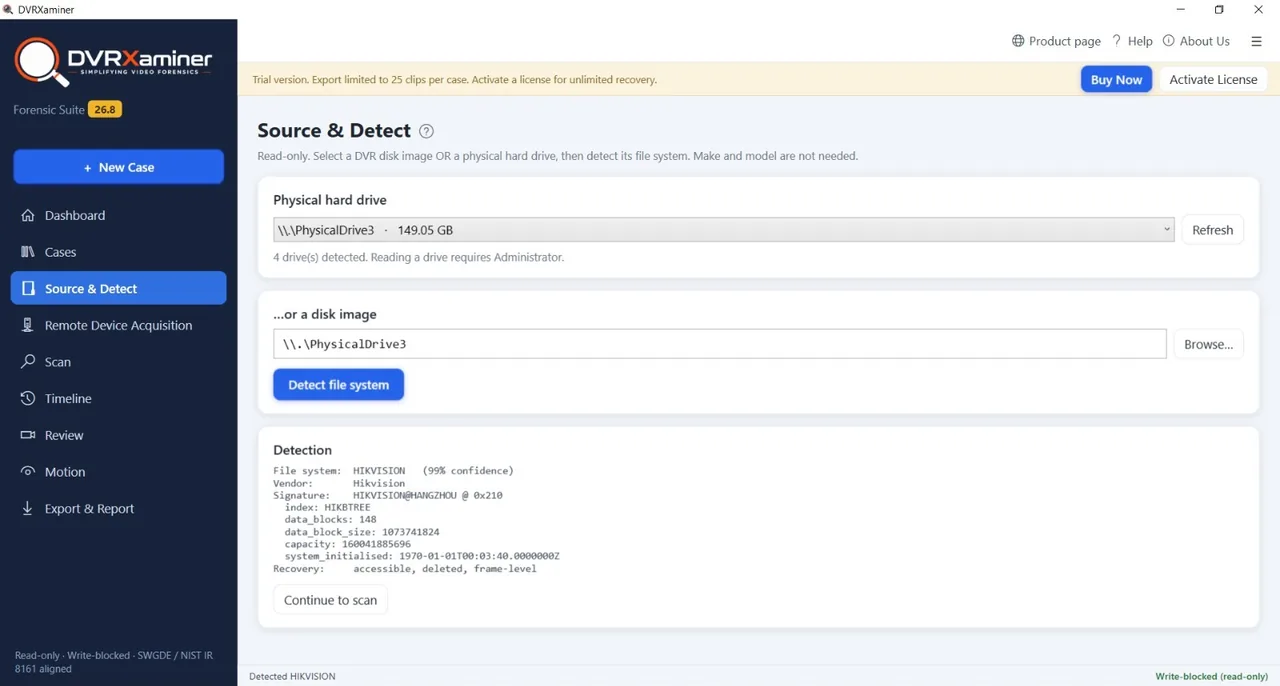
No make or model required
Source and Detect takes a physical drive, a card or a disk image and works out what wrote it. The result names the vendor, a confidence score, the on-disk signature, the index type and the block layout. You do not have to know the recorder to open its disk.
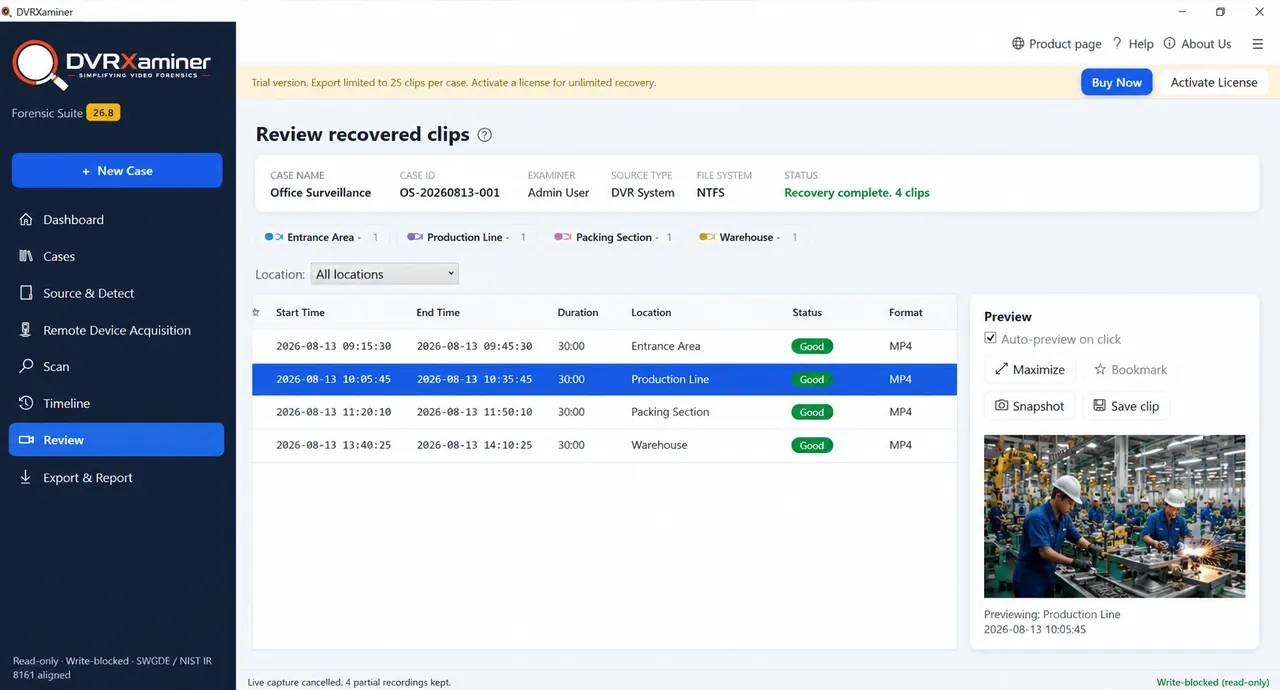
Case name, case ID and examiner stay on screen
Review lists what the scan found, one row per clip, with a start time, an end time, a duration, a location, a status and a format. Each one plays in the preview pane. This is where cctv footage analysis actually happens, because you are watching the material rather than reading a file listing.
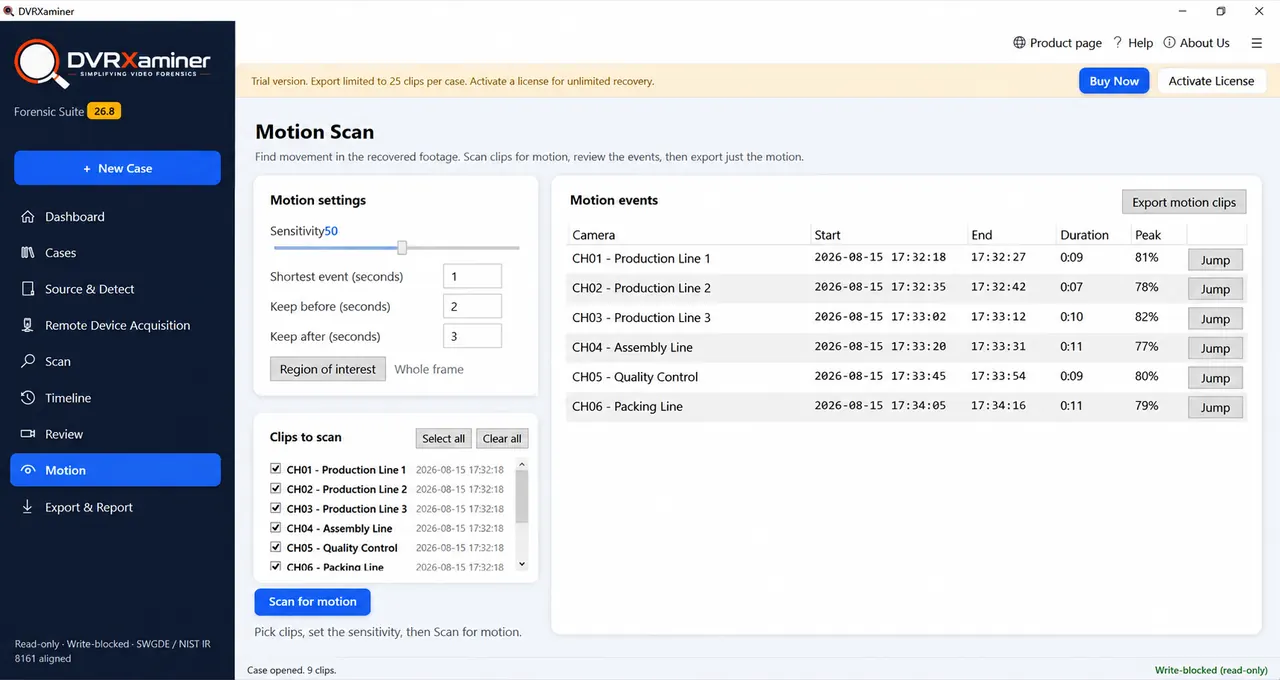
Keep the movement, drop the empty hours
Motion Scan reads the clips you select and returns only the segments where something moved. Each event carries a start, an end, a duration and a peak score, with a jump straight to the frame. Export motion clips writes those segments out on their own.
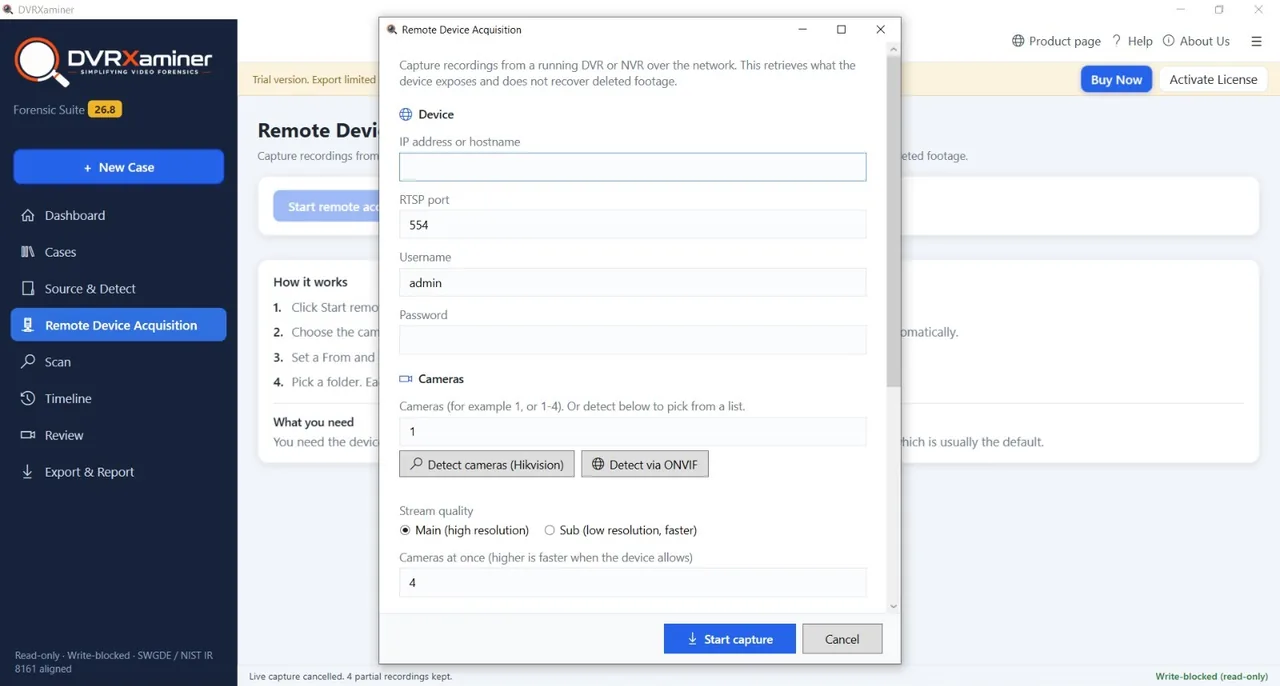
Nothing has to be unracked
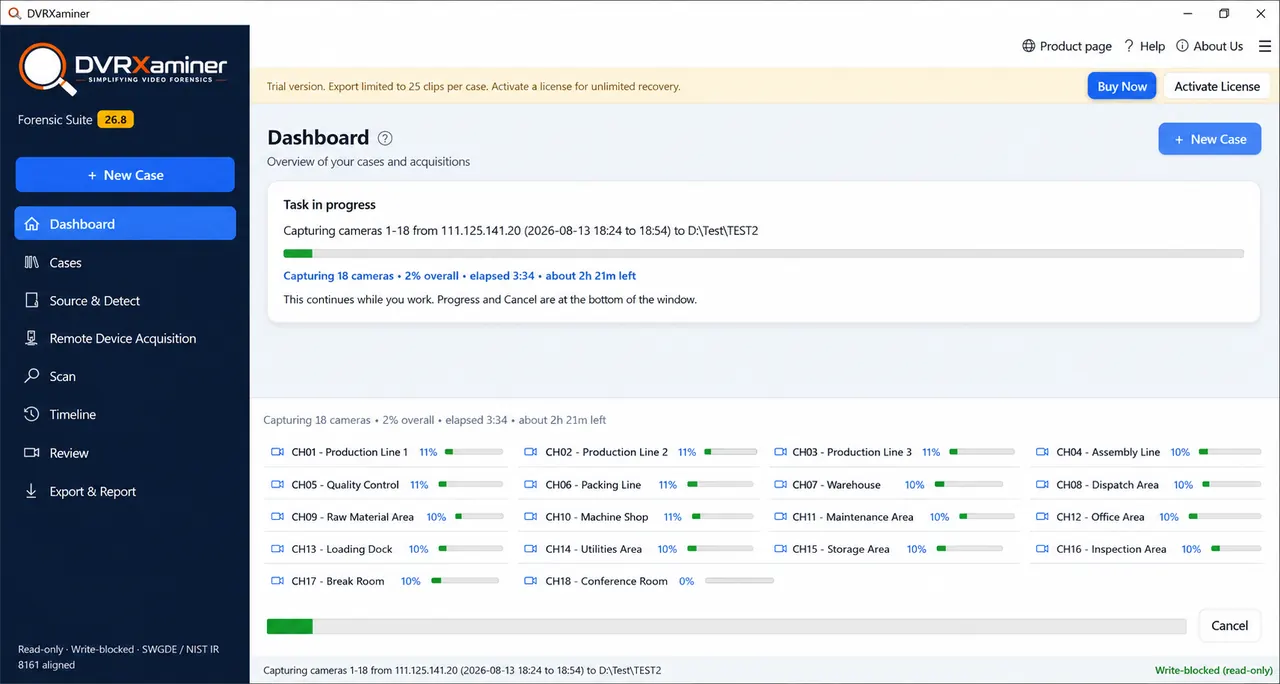
Remote Device Acquisition connects to a running DVR or NVR across the network and captures recordings straight to a folder. Cameras are detected for you or given as a range, and each job runs between a from time and a to time. This is cctv acquisition without touching the hardware.
The capture runs while you keep working
Captures sit in the background with a progress bar for each channel under its assigned camera name. The Dashboard reports overall progress, elapsed time and an estimate of what is left. Cancelling keeps every recording already written to disk.
Six steps from a disk Windows will not mount to MP4 or AVI files you can hand over. The order matters, because each step narrows the case before anything is written out.
Connect the recorder drive through a USB dock or an internal SATA port, then dismiss the Windows format prompt. A disk image loads in place of physical media.
Detection parses the structures on the platters and names the vendor with a confidence score. A volume Windows marks unformatted still resolves here.
A panel shows every camera the recorder wrote. Under each sit its clips, with a start time, an end time and a duration read from the channel index.
Narrow by camera and by clock time. A single channel and a single hour come out without touching the rest of a multi terabyte disk.
Optional, and useful on long retention. The scan returns segments that contain movement with a peak score, so quiet hours never reach the export.
Pick a container and a destination folder. Channel, camera name and recorded timestamp travel into every file, and the source disk is not written to.
There are two ways to get video off a recorder. One goes through the unit's own menu and hands you whatever the vendor decided to write. The other goes at the disk. They produce different material, and the difference matters once someone starts asking where the file came from.
Buying forensic video software usually comes down to three questions. Can it open the disk, can it narrow a week of footage down to the minute that matters, and can it show its working afterwards. Pick a group to see what DVRXaminer does about each.
Getting the material out of the recorder, whether the unit is on a bench with its lid off or still racked and running on the network.
A physical disk, an SD card or a forensic image all open through the same screen and produce the same clip listing.
Vendor, index type and block layout are read off the disk itself, with a confidence score against the result.
Port 554 with the device credentials, cameras found over Hikvision or ONVIF, and a from and to time set for each job.
Set how many cameras to capture at once, with a progress bar for each and the rest of the tool still usable.
Turning a week of continuous recording into the few minutes anyone actually needs to watch. This is where cctv video analysis software earns its licence.
Narrow by camera and by clock time before anything is written, so one channel and one hour come out on their own.
Sensitivity, minimum event length and padding are yours to set, and each event comes back with a duration and a peak score.
Draw the area that matters or scan the whole frame. A doorway in the corner stops competing with a busy road behind it.
Play any clip end to end before deciding, and take a snapshot or a bookmark on the ones you want to come back to.
Showing where a clip came from, who took it out and what the disk looked like at the time. Without that, the footage is just a file somebody sent.
Case name, case ID, examiner, source type and file system sit across the top of the review screen and follow the job.
The source disk is never written to, so a second examination of the same drive returns the same listing.
Recorded timestamp, channel and camera name go into the export, so clips from several cameras line up on a timeline.
The clips you saved and the record of the job come out of the same screen rather than being assembled by hand afterwards.
Hikvision units write WFS and Dahua units write DHFS. Some NVRs recording IP camera streams use no proprietary layout at all. Two units from the same maker can write differently after a firmware revision, so attach the drive in the free trial and read what Source and Detect reports.
Whether cctv footage as evidence is admitted is a matter for the court, and the rules differ by jurisdiction. What an examiner controls is the handling, and that is usually what gets challenged first.
Where footage is likely to be contested, take an image of the drive and work from the copy. The original then never spins again.
Every read is non destructive, so nobody can argue the footage changed while it was being examined. The disk stays usable for a second pass.
Case name, case ID and examiner attach to the job at the start and stay in the header, so the export is traceable to a person.
Recorder time is often minutes or hours out. Note the offset against a known clock at acquisition, because reconstructing it later is guesswork.
Exports wrap the original frames into MP4 or AVI. Nothing is sharpened, cleaned or enhanced, so the material you hand over matches the disk.
Overwriting and motion triggered recording leave holes in a timeline. Exporting whole clips with their real times shows the gaps instead of hiding them.
Every operation is a read, and the status bar states that the session is read only, write blocked and aligned with SWGDE and NIST IR 8161 while a case runs. DVRXaminer supports chain of custody. It does not decide admissibility, and no software can. Where the stakes are high, follow the disclosure rules that apply in your jurisdiction and keep the original disk out of service.
The examination runs without limits. Attach a real evidence drive, let it detect the layout, list every channel and play any clip end to end. The cap only applies at the point a clip leaves the tool.
Trial limits, what the software reads and where the line sits between examination and everything else.
Take the disk out of the recorder and attach it to a Windows machine through a USB dock or an internal SATA port, then dismiss the format prompt Windows raises. Source and Detect reads the on-disk structures, names the vendor layout with a confidence score and produces a clip list with clock times. Pick the cameras and the hours you need, then export those clips as MP4 or AVI. A forensic image opens the same way, which is the usual route once the drive has been bagged as an exhibit.
That depends on the jurisdiction and on how the footage was obtained, so treat it as a question for the court rather than for a software vendor. In most systems the recording itself is handled as documentary or real evidence while the disk it sits on is the physical exhibit. What a tool can affect is provenance. DVRXaminer reads without writing, records the case name, case ID and examiner against every job and produces the same listing on a second pass over the same disk.
Reliability turns on whether the footage can be shown to be what it claims to be, which is also why the question of whether cctv is direct evidence tends to come down to the surrounding record rather than the file. Clock drift on the recorder, gaps caused by overwriting, motion triggered recording and re-encoding during export all get challenged. Acquiring at the disk rather than through the recorder menu removes the re-encoding argument, and carrying the channel, camera name and recorded timestamp into every exported file keeps the timeline defensible. Where footage is likely to be contested, image the drive first and examine the copy.
Coverage includes Hikvision, Dahua, CP Plus, Bosch, Honeywell, HiFocus, Sony, Uniview, Prama, Swann, Lorex, Sparsh, Night Owl, Qubo, Godrej, Zmodo, Zicom, TVT, Matrix and Truview. Hikvision units write WFS and Dahua units write DHFS, and some NVRs recording IP camera streams use no proprietary layout at all. Two units from the same maker can write differently after a firmware revision, so attach the drive in the free trial and read what Source and Detect reports before committing to anything.
Scanning, listing and reviewing are unrestricted. You can run a full examination on a real evidence drive, see every clip that was found and preview each one at full length. The cap applies only when a clip leaves the tool. The trial exports 25 clips per case, and each saved clip is cut at the first 60 seconds by time rather than by file size, so the length is the same whatever the bitrate. A message after each trial save says the clip was limited to one minute. A licence removes both caps.
No, and that is deliberate. Enhancement and clarification are a separate discipline with their own tooling and their own admissibility arguments. DVRXaminer acquires and exports what the recorder wrote. Frames are repackaged into MP4 or AVI rather than re-processed, so what you hand over matches what was on the disk.
No. The video sits on the platters rather than inside the unit, so a recorder that will not power up, that was damaged or that was thrown out makes no difference. An unknown admin password guards the recorder menu and its web console, and reading the disk on a computer goes through neither. Remote Device Acquisition is the exception, because it captures from a running device over the network and does need credentials.
Because there is no filesystem on it that Windows recognises. Most recorders write their own layout straight across the disk with no MBR or GPT and no NTFS, exFAT or ext4, so File Explorer shows no volume and Disk Management offers to initialise the drive. Do not accept that offer. Initialising writes a fresh filesystem over the channel index, which is the map of which camera occupied which stretch of disk at which time.
Yes. Remote Device Acquisition connects over RTSP on port 554 with the device credentials, detects the cameras over Hikvision or ONVIF or takes a range such as 1-16, and captures between a from and to time straight to a folder. Captures run in the background with a progress bar for each channel, and cancelling a run keeps every recording already written. Remote capture retrieves what the device exposes, so it does not reach deleted footage.
Tell us the recorder, the disk size and what you are trying to establish. An engineer will tell you what the examination actually involves.

Detection, scanning and preview cost nothing and write nothing. Attach the drive, see what layout it holds and how much of the retention window survives, then decide whether the case needs a licence.
Version 26.8 · Windows 11, 10, 8.1, 7 and Server · 30 day money back
DVRXaminer walkthrough
1 / 4 · scroll or drag sideways