
Skip to download
RecoveryTools

RecoveryTools · Evernote migration software for Windows

Evernote Migration Tool

Move Evernote notes out of an ENEX export file, or straight from a connected account with nothing exported first. Save them as PDF, Word, Outlook or image files.

Download free trialWindows installer, downloads a Windows installer file

No credit card, no scripts, no sign-up. Run a notebook through it, open what lands and buy only if that output is what you wanted.

Screenshot of source selection in Evernote Migrator

What The Evernote Migration Tool Does

Evernote Migrator Support And Licensing

Two Ways To Migrate Evernote Notes

Two Ways Into Your Evernote Notes

Most Evernote converter tools accept one thing, an ENEX file you exported yourself. This Evernote migration tool will convert ENEX files the same way, and it reads a connected account as well, so a single licence covers both jobs.

Evernote Export File

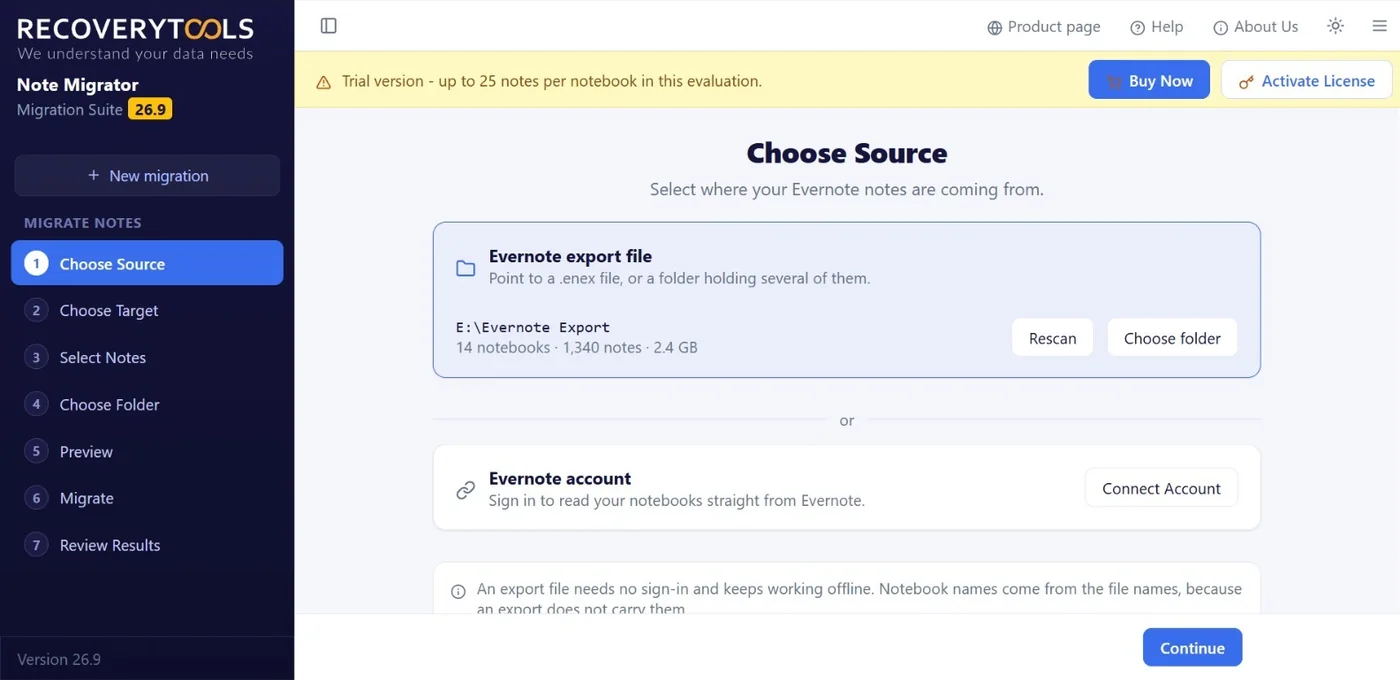
Point at a single .enex file, or at a folder holding multiple ENEX files. That folder is scanned first and the result is shown to you, so a job reading fourteen notebooks and 1,340 notes at 2.4 GB tells you how big this work is before you commit to it. Rescan picks up anything added since. No sign-in of any kind is involved and it keeps working with no network at all.
Connected Evernote Account

Connect Account signs you in at Evernote and reads notebooks straight from a live account. Nothing has to be exported first and nothing has to be unzipped. Because notebooks are read as they actually exist, real names travel with them rather than being guessed at. Take this route when an account is large enough that exporting is itself the slow part.

Inside The Evernote Migration Tool

Evernote Migration, Screen By Screen

Every screen below is in one $39 licence. Nothing here is a paid module and no saving format costs extra.

Evernote migration tool choosing an export file or account

Choose Your Evernote Source

ENEX Files Or A Live Evernote Account

Step one asks a single thing and offers two routes to answer it. Pick a file and that folder is scanned and summarised on the spot. Pick an account and your notebooks are read live. Which route suits you is printed underneath rather than buried in a help page.

  • Choose folder for an export, Rescan when its contents change
  • Source path, notebook count, note count and size, all shown together
  • Connect Account as the alternative, with nothing prepared beforehand
  • An export works offline, and it carries no notebook names of its own
Evernote migration tool source panel with the scanned export folder

Pick An Evernote Saving Format

Evernote To PDF, Word, Outlook Or Image

This step is where a run stops being a copy and turns into a conversion. Document formats for reading and archiving, email formats when notes have to land in a mail client, image formats when a note is really a picture.

  • PDF, DOCX and DOC for documents, with RTF, TXT and HTML alongside
  • PST, MSG and EML when the notes belong inside a mail client
  • JPG, PNG, TIFF, GIF and BMP when the note is closer to a picture
  • One format per run, so a second pass gives you the same notes in another shape
Evernote migrator listing a scanned notebook folder before selection

Select Evernote Notes And Notebooks

Evernote Tag Filters Do The Narrowing

Everything found in your source is listed with a checkbox beside it, so a run can cover one notebook or entire notebooks in a single pass. Tag rules then do narrowing that ticking by hand cannot.

  • Check or uncheck any notebook and note, one box each
  • Manage notes as per tags, grouping output into folders you already use
  • Convert tags starting with a prefix you type, for a large tag library
  • Nothing is ticked on your behalf
Evernote migration software showing the scanned source path and size

Control Evernote Output Folders

Saving Options For Converted Evernote Notes

Send output to any folder, a local drive, an external disk or back where your source came from. Saving options decide what shape it arrives in rather than only its address.

  • Any destination, including external and network storage
  • Create single PDF to merge a notebook, or one file per note
  • Include titles, so notes stay findable by name afterwards
  • Save converted files to the respective folder when that is easier to track
Evernote migration tool interface before a run is started

Preview An Evernote Migration First

Last Check Before Notes Are Written

Preview lists exactly which notes your settings have picked. That is your moment to catch a tag rule doing more than you meant, and it costs seconds against finding out weeks later.

  • Your selection restated before a first note is written
  • A rule doing too much is visible here rather than afterwards
  • Nothing has been written yet, so changing your mind costs nothing
Evernote migrator window showing notebook and note counts

Review Evernote Migration Results

Every Evernote Run Leaves A Log

A note migration that goes wrong rarely announces it. This closing step exists so a run is checked instead of trusted, and a log lands next to your converted data as a record to go back to.

  • The run is closed out rather than left at a progress bar
  • A log file written alongside the output
  • Destination folder opened once a run finishes

Evernote Saving Formats And What Carries Over

What An ENEX File Can Become

Seventeen saving formats ship with one licence, so an archive, an editable document and a mailbox copy all come out of the same Evernote file converter. Convert ENEX files once, or run a whole folder through the ENEX file converter as one batch.

Notes written in any script come through as they were, so a notebook mixing languages does not need splitting up before a run.

Evernote Migration Software Features

Where A Note Move Usually Goes Wrong

Notes look like the simplest thing anyone ever asked to move, which is why most people try it by hand first. Three problems send them looking for an Evernote migration tool instead.

Evernote Export Is Slow On A Big Account

Evernote exports up to 100 notes at a time, or one notebook at a time, and only from its desktop app. For an account built over ten years, that queue is most of your work rather than a warm-up to it. Connecting your account skips that queue instead of speeding it up.

ENEX Export Loses Your Notebook Names

ENEX carries notes. It does not carry the name of the notebook they came from. Anything working purely from export files has to rebuild your structure out of file names and hope you named them well, which is why our first screen says so plainly.

Note Conversion And Data Loss

Data loss during a note conversion is rarely loud. A run finishes, says it succeeded and leaves you to find weeks later that original formatting, an image or a whole attachment never came through. That is an argument for reading your selection back beforehand and checking each run afterwards.

Evernote To OneNote, Notion Or Obsidian

Where Your Notes Go Next

This Evernote migrator writes files. It does not sign in to your new app for you. Pick a format that app already imports and the handover takes one step.

Evernote To OneNote

OneNote is where most people leaving Evernote end up. Save your notebooks as DOCX or HTML, then import those files into a OneNote section. Doing it this way means you are not waiting on an importer that only accepts ENEX and only runs on Windows.

Evernote To Notion, Obsidian Or Apple Notes

Notion, Obsidian, Joplin, Bear, Notesnook and Apple Notes all read plain HTML or plain text. Save a notebook as HTML or TXT and it goes in through their own import screen, with no plugin and no command line in between.

Evernote To Outlook Or A PDF Archive

Not everyone is moving to another note app. Some people want notes filed beside their mail, which is what PST, MSG and EML are for. Others want a backup they control, a set of PDFs on their own drive, readable in ten years with no subscription attached to them.

Evernote Migrator Capabilities

Three Evernote Jobs Done In Minutes

Three jobs that cost a weekend by hand. All three are covered by one purchase, with no per notebook or per gigabyte billing.

Open ENEX Files Without Evernote

Our ENEX converter opens .enex, .html and .mht files on its own, so you can read what is inside them with no note-taking app behind it and no plugin to add. That matters most in a situation people are usually in when they come looking, which is that a subscription has already lapsed and those files are all that is left of years of meeting notes, project records and personal writing.

Bulk Convert A Folder Of ENEX Files

Add a directory rather than a file and every export inside it is handled together, in one pass with one set of settings. Bulk conversion has no cap on how many notes go through and no file size limit either, so thousands of notes across a decade of notebooks stay one job rather than an afternoon of repetition.

Extract Evernote Attachments On Their Own

Sometimes it is not the notes you need but the files attached to them. Extract attachments writes every image, PDF and document into a folder of its own, so what you actually need is recovered without converting surrounding text at all.

How To Migrate Evernote Notes

Migrate Evernote Notes In Six Steps

Seven screens, six decisions, nothing to script. A first notebook goes through inside the free trial, so evaluating this Evernote migrator costs an evening rather than a purchase order.

  1. Point At Your Evernote Notes

    Point at an export file or a folder of them, or connect an Evernote account instead. On a file route, scanning reports how many notebooks and notes turned up and what they weigh, so you know the size of the job before starting it.

  2. Choose An Evernote Saving Format

    Decide where the notes are going.

  3. Select Notebooks And Notes

    Cut the run down to the notebooks and notes that actually need moving.

  4. Set Where Converted Notes Land

    Set where the output is written.

  5. Preview Your Evernote Migration

    Read back what your current settings actually selected, before a single note is written. Catch a filter doing more or less than you meant while changing it still costs nothing.

  6. Migrate Evernote Notes, Then Review

    Start a run and let it work. When it stops, a closing screen shows how the job went rather than leaving you at a finished progress bar, and a log file lands beside that output so something exists to check against weeks later.

Evernote Migrator vs Exporting By Hand

Two Routes To The Same Notes

The manual method is free, and for twenty notes it is the right call. Past that, here is what $39 buys you instead.

Manual export and conversion
Evernote Migrator
Every notebook has to be exported first, a batch at a time
Connect the account and the export step disappears
Notebook names have to be reconstructed from file names
Read from the account, so the real names travel with them
Files handled one at a time, or in whatever order you remember
A whole directory of exports scanned and handled as one job
The size of the job is a guess until you are already inside it
The scan counts notebooks, notes and size before you start
No way to see what a run will do until it has already done it
A preview step reads your selection back beforehand
Nothing to check afterwards except the destination folder
A review step closes out every run

Evernote Migration Tool Specifications

Evernote Migrator, Before You Install

Evernote Migrator Software

Product name
RecoveryTools Note Migrator
Version
26.9
Licence
$39

Evernote Formats And Platforms

Source files
.enex, .html and .mht exported from Evernote
Source account
A connected Evernote account, read directly
Document output
PDF, DOCX, DOC, RTF, TXT, XPS, EPUB, HTML and MHT
Email output
PST, MSG and EML
Image output
JPG, PNG, TIFF, GIF and BMP
Operating system
Windows 11, 10, 8.1 and 7 · 32-bit or 64-bit

Evernote Migration Options

Steps
Seven · Choose Source, Choose Target, Select Notes, Choose Folder, Preview, Migrate, Review Results
Selection
Per notebook and per note, plus tag rules
Attachments
Carried with the notes, or extracted into a folder of their own
Batch
A whole directory of exports in one run, with no count or size cap
Record
A log file written beside the output
Trial
25 notes per notebook, with every step unlocked

Evernote Migration FAQs

Evernote Migration Questions Answered

Do I have to export my notes from Evernote first?

No, and that is what separates this Evernote migration tool from a plain converter. Connect Account takes you through an Evernote sign-in and pulls notebooks from there, so nothing has to be prepared, queued or unzipped first. An export file still works and is often better when those files already sit on disk, or when an account has since been closed.

What is an ENEX file?

ENEX stands for Evernote Export. Evernote writes this file when notes are taken out for use somewhere else. A single file can hold many notes. Give our tool one file, or a whole directory of them, and that directory becomes one job rather than a series of separate ones.

Why do my notebook names look wrong after an export?

Because ENEX does not carry them. An export file holds notes, not a notebook name, so any tool working from export files has to borrow that name from a file name instead. Our first screen says so plainly rather than leaving you to find out later. Connecting your account avoids this, because notebooks arrive with the names you gave them.

Can I migrate without signing in to Evernote?

Yes. An export file asks for no sign-in and keeps working with no network connection at all. People usually take that route once an account has been closed, or when notes have to be handled on a machine that is not allowed online.

Can I migrate one notebook instead of everything?

Yes. Select Notes is a step of its own, sitting between choosing a saving format and choosing an output folder, so narrowing a run down is part of your ordinary path rather than an advanced setting hidden behind something.

Can I see what will happen before it runs?

Yes. Preview is step five of seven, immediately before Migrate, and it reads back what your current settings actually picked out. Scanning gives you a similar check earlier on, since it reports how many notebooks and notes were found and what they weigh. Review Results then shows you how the run went at the end.

Can I move my Evernote notes to OneNote, Notion or Obsidian?

Yes, through a file rather than a direct connection. Write a notebook out as DOCX or HTML for OneNote, or as HTML or TXT for Notion, Obsidian, Joplin, Bear and Apple Notes, then use that app's own import screen. Working through a file leaves you with a backup as well, one that does not depend on either service staying available.

Do I need the Evernote desktop app?

Only if you take the export route, because Evernote will not export from its web app. Install the desktop app on Windows or Mac, export your notebooks as ENEX or HTML, then point us at that folder. Connect Account skips this, which is the reason it exists.

Are tags, created dates and other metadata kept?

ENEX is an XML format and it stores tags, created date and author as metadata, provided you left those attributes ticked when Evernote wrote the file. Untick them at export time and they are gone before any converter ever sees them, so leave them on. Tags can then shape your output folders during a run.

Do my notes get uploaded anywhere?

Conversion happens on your machine. Take the export route and nothing leaves it at all, because that path needs no network and no sign-in. Take Connect Account and the only traffic is between your computer and Evernote, reading your notebooks down to your own disk. No middle server holds your notes, so privacy does not rest on one.

Can I open an ENEX file without Evernote?

Yes. Point us at the file and its notes are read, listed and converted with no note-taking app installed. People usually arrive at this once a subscription has lapsed and an old export is all that survives, which is exactly when a file nothing on the machine can open becomes a problem.

What does it cost and what does the trial allow?

39 US dollars, paid once, with no subscription behind it. A free trial caps each notebook at 25 notes and unlocks everything else, so a real notebook goes all the way through and you read that output before paying. It is enough to check what people actually worry about, which is whether notes arrive looking like notes.

Which formats can I save my Evernote notes to?

This Evernote ENEX converter supports documents as PDF or a Word file, with RTF and TXT, plus XPS, EPUB, HTML and MHT also available. Email formats cover PST for Outlook alongside MSG and EML for individual messages. Images cover JPG, PNG, TIFF, GIF and BMP. A run produces one format, so if one notebook is wanted as an archive and as something editable, run it twice.

Can I pull the attachments out on their own?

Yes, and it is a mode of its own rather than a side effect. Turn it on and files buried inside your notes are recovered into a folder by themselves, so when those files are what you actually want, surrounding text does not have to be converted at all.

Can I convert a whole folder of ENEX files at once?

Yes. Give it a directory rather than a single file and its contents go through together, under settings you choose once. Neither note count nor source size is capped, so ten years of notebooks does not have to be broken into sittings.

What happens to my tags?

Tags do more than survive, they can do your filing. One rule builds destination folders out of existing tags, so structure is there the moment a run ends. Another takes only notes whose tag starts with a word you type, which is a practical way through a tag library holding hundreds of entries.

Do I need Evernote installed to use it?

No. Exported files are parsed directly, so nothing else has to be present on that machine and no plugin needs adding. It is usually where people find themselves by the time they start looking, because a subscription lapsed a while ago and those files are all that survived.

Try It On One Notebook First

Ten minutes with this Evernote migration tool tells you more than any feature list. Run a notebook, open what lands, then pay $39 once if it is right. There is no subscription behind it.

Evernote MigratorFree trial · Windows
Trial Pricing