Blog
Blog  +1 7025533020
Extract Attachments from EML Files: 4 Manual & Automated Ways


EML files from any source, stores attachments encoded in Base64 MIME. To extract attachments from EML files – a common need for compliance and organised storage in business, there are multiple routes available i.e.
- Using an email client or online extractor: for free export from smaller number of EML archives
- There are dedicated “EML Attachment Extractor”, Python Scripts & CLI tools that automate bulk downloading attachments from EML – saving time & manual effort without opening every single EML file.
Extracting attachment from EML requires decoding this RFC 5322 + MIME and exporting them correctly in their original format, size, and with a correct naming without overwriting.
What is an EML File? A Quick Recap
EML is a standard file format which is used to store a single email message with metadata, header and attachments. It is a plain text file (also includes HTML content) and is commonly used by email clients like Thunderbird, Outlook or Windows Mail.
EML files are widely used for transferring data as these are lightweight files, storing emails for backup, or archiving them for temporary use. In short, it is a convenient format for better email management and storage.
Disclaimer: This guide discusses how to extract attachments from EML files stored locally on your computer. Read here to: Extract Attachments from Emails stored on a cloud or webmail account.
Why Extract Attachments from EML Files?
- It allow users to organize or manage sensitive EML attachments separately for future use.
- Gives users easy access to files without opening each EML file every time.
- Some attachments include invoices, legal files etc., which a user may require for legal use.
- Extracting attachments from EML files helps to reduce storage size.
- Users can hassle free share EML attachments to another platform.
Automated Solution to Extract Attachments From EML Files
RecoveryTools EML Attachment Extractor is a desktop application for Mac & Windows OS to quickly download every attachment from multiple .eml files without limitations on file size or the number of EML files while keeping the source intact in a secure & offline way.
Free download RecoveryTools standalone EML attachment extractor gets EML attachment without any setup or configuration.
Easy Steps to Download Attachments from EML File
- Download and install the RecoveryTools EML Converter software on your system.

- Select EML files or folders from which you want to extract attachments.

- Then, select CSV as a saving option.
- Browse destination path and click Convert.
- After completion, you will see an Attachment folder in which you’ll find all the extracted EML attachments.

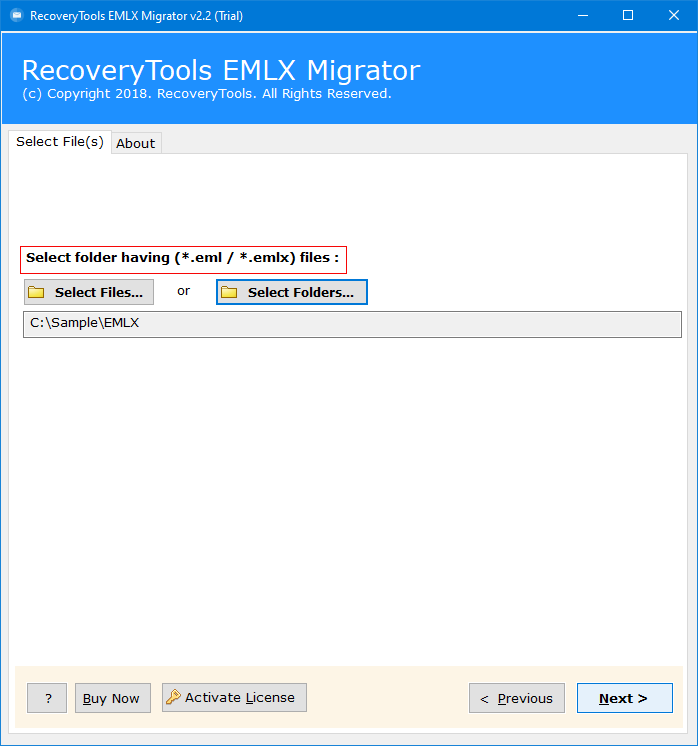
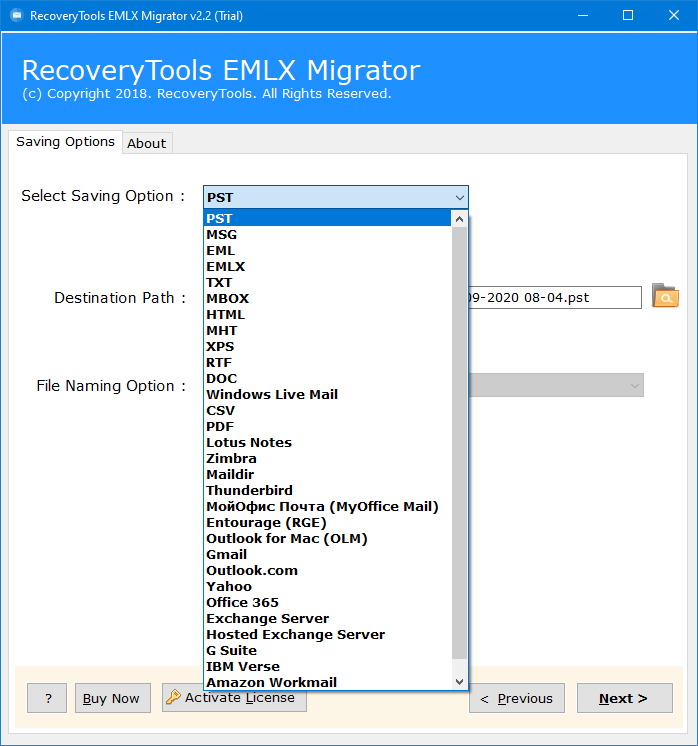
Key Features of RecoveryTools EML Attachment Extractor Software
|
📎 Extract All Attachments From EML
Extract all PDFs, DOCX, XLSX, JPG, ZIP, nested EML, and other standard file formats without modification in extension or file quantity. Get embedded images & attachments in EML files as well.
|
📂 Bulk Extraction With Intact Folder Structure
You can extract multiple large EML files or folders with EML files without any restriction simultaneously. Required by IT admins & business when dealing with thousands of .eml files for legal & compliance needs.
|
🔍 Nested EML Attachment Handling
Parses forwarded messages and embedded .eml attachments in depth to extract inner attachments missed by basic tools and manual methods.
|
|
🌐 Supports EML from All Sources
Extract attachments from EML file from any source be it Gmail download, Thunderbird export, Outlook drag & drop, Apple Mail (.emlx).
|
🏷️ Advanced File Naming Convention
Multiple EML may contain attachments with identical names, each one is saved separately instead of overwriting the last – preventing data loss.
|
🔤 No File Name Issues
Preserves the original file name of the attachment in EML while handling non-English (non-UTF-8) and special-character filenames (RFC 2231) properly.
|
Extract EML Attachments Using a Desktop Email Client (Thunderbird)
Here in this section, we will discuss a tested manual method to extract attachments from EML files for free. For the extraction process, you’ll require Thunderbird installed on your system. So, let’s get started. Follow these steps carefully.
- Open Thunderbird and the folder where you want to view the EML file.

- Next, locate EML files saved on your device.

- Once done, drag and drop those EML files into Thunderbird.
- Open each message one-by-one and you will see attachments in the bottom, simply Click Save.
- Browse a destination path and Save EML attachments.


This manual way seems to be easy and effective, but it does hold some limitations that you should know before performing or continuing with this method. So, keep reading the article.
Limitations of Using Desktop Email Client to Extract EML Attachments
- Thunderbird installation is a must to extract attachments from EML files.
- It is a time-consuming process especially when you have multiple EML files with attachments.
- Users need to process EML files one-by-one as it does not support bulk extraction.
- Requires human effort and proper configuration knowledge.
- Attachments may lose their originality and structure after download.
Alternative Solution: Extract EML Attachments Online
There are multiple online EML file viewer tools that let users extract attachments from EML files without needing any installation simply via the web-browser on all Mac, Win & Linux devices.
Best For: Users with a few EML files (generally under 5MB) who need quick one time extraction.
- Upload your EML files from which you want to save attachments on the Online web app.
- Drag & drop attachment opened in the web-app to the PC.
- Repeat the process with all EML files.
Advantages & Risks of Using an Online EML Attachments Extractor
| Pros | Limitations |
|---|---|
| Quick extraction without installation | Not suitable for bulk EML files. |
| Works across Windows, Mac, and Linux | Risk of data breach as files are uploaded on a third-party server. |
| Most are free to use and have no-added cost | Nested and embedded image attachments are lost. |
Using Python to Get Attachment from EML Files
Python has an in-built “Email” library that enables reading RFC 5322 + MIME structure which can be used to extract attachments. The process to extract attachments from EML involves:
- Using
email.message_from_bytes()to load .eml files saved on your computer. msg.walk()– to read all elements like body, attachment, header of the EML file uploaded.- Filtering parts where
get_content_disposition()returns attachment. - Use
get_payload(decode=True)to decode Base 64 encoding. - Exporting the output attachments with
get_filename().
Using Free CLI Based Tools
On Linux and macOS systems, Munpack, while on Windows using MimeKit + Powershell are CLI-based open-source CLI tools built specifically to decode MIME-encoded EML file attachments.
FAQs: Extract Attachments from EML
Q: Can encrypted (S/MIME or PGP) EML attachments be extracted directly
Yes, however using RecoveryTools EML Attachment Extractor is a recommended solution to extract attachments from encrypted EML message. Manual methods often fail here.
Q: Will extracting attachments from an EML file delete them from original .eml file?
No, downloading attachment from EML keeps the source 100% intact without any corruption.
Q: Can attachments from nested eml (email forwarded as eml) be extracted?
Yes, the advanced software solution allows you to save attachment from forwarded or nested EML files.
Conclusion
It is essential to extract attachments from EML files to access or share them on different devices. While there is a manual way using Thunderbird but it is only suitable for a small volume of data and consumes time. To overcome this, we have mentioned a tool in the article that will help users to download attachments from EML files securely in just a few clicks. Additionally, the professional solution guarantees accurate and perfect results with complete data integrity.
Read all the methods properly and choose the one that simplifies the EML file attachment extraction process. If you have any query related to the software, feel-free to contact our support team. You can click on Live Chat to directly chat with our team or email on [email protected] if they are not available.