Blog
Blog  +1 7025533020
How to Download Multiple Attachments from Yahoo Mail at Once?


Need a way to download all attachments from Yahoo Mail? Yahoo Mail is the third largest web-based email provider in the world and offers plenty of free storage space (about 1 terabyte). Finding large files quickly while using it to download multiple attachments from Yahoo Mail can really be a challenge; plus, Yahoo has had a number of data breaches that have prompted many users to take their important information off of Yahoo and onto their own hard drive or other local computing device for safe storage.
“how to download all attachments in Yahoo Mail at once?” You might be wondering. Yes! Regardless of whether you need to backup specific items or you need to download all the attached items in Yahoo, you will learn here how to download multiple attachments from Yahoo Mail on both desktop and mobile.
Download for Windows Download for Mac
Why You Should Download All Attachments from Yahoo Mail?
There are many reasons why users download all attachments from Yahoo Mail. Here are some of the most common reasons for users downloading their attachments:
- Store data for offline use: Downloading your attachments will provide you with access to important files anywhere, even when you don’t have internet access, so when you travel, you can still access your files.
- Create a backup copy: If you save an attachment on your local drive, it serves as a backup in case you accidentally delete the file. Furthermore, if something goes wrong while trying to download multiple attachments from Yahoo Mail, having a local copy ensures you have something to reference when trying to resolve the issue.
- Provide professional services: Having a local copy of an attachment provides all new businesses with the same day-to-day service they need to function normally, such as printing documents or copying files from one location to another.
Method 1: How to Download Attachments from Yahoo Email on a Computer
If you need to save just a few files, the manual method to download attachments from Yahoo Mail makes this easy and quick.
- Log in to Yahoo Mail on your computer.
- Find the email that includes the attachment you want to download.
- While viewing the email, move your mouse to the right of the file name on the list of files (this will show as a download icon).
- Click the download button to save the attachment to your computer.
Once you have saved the attachment, you might ask yourself, “Where do Yahoo Mail downloads go to?” They will go to your default download location, which is usually the ‘Downloads’ folder on your computer.
Method 2: How to Download All Attachments in Yahoo Mail on the Web
Yahoo Mail provides a way to download all attachments from Yahoo Mail in an email. The process isn’t overly complicated:
- Log in to Yahoo Mail using your web browser.
- Open the email message containing the attachments.
- Click on the “Download All Attachments” button, and Yahoo will package the contents of that email in a zipped format.
- Save this folder on your computer and extract the files from the zip file manually.
Method 3: How to Download Attachments from Yahoo on Mobile Devices
You can quickly save attachments while managing your emails or if you have problems downloading attachments from Yahoo Mail while away from home using Android and iPhone devices.
- Android Users
- Open the Yahoo app.
- Navigate to an email with an attachment.
- Tap download from the attachment’s context menu and the file should save to your phone.
- iPhone/iOS Users
- Open the Yahoo mail app.
- Select the email with the attachment.
- Tap and hold on to the attachment and choose Save to File to save it directly to your device’s file storage.
Disadvantages of Manual Methods
Although it is free to extract fewer than one hundred files, using native retrieval methods to download multiple attachments from Yahoo Mail for larger quantities of files has many disadvantages:
- Time-consuming: Extracting attachment after attachment from hundreds of emails takes time and reduces how productive you can be.
- Loss of Folder Structure: Extracted files are combined into one folder without regard to either e-mail folders or how those folders were originally constructed.
- Cumbersome Zips: Native bulk retrieval operations also require unzipping and sorting each group of extracted files manually.
- No Advanced Filtering: You cannot filter for specific files by date, sender, or type.
- Risk of Losing Data: Due to timeouts from either a server being busy or human error, data will not be retrieved fully or in their original email context.
Method 4: The Best Way to Download Multiple Attachments from Yahoo Mail in Bulk
The fastest and safest method to download multiple attachments from Yahoo Mail is with a professional Yahoo Mail attachment downloader like RecoveryTools Yahoo Backup Wizard due to severe limitations of manually downloading, such as tedious extraction processes and disorganized files. If you need to know how to download attachments from multiple emails in Yahoo Mail, this software provides a simple solution for downloading all attachments from Yahoo Mail at once, regardless of whether you are a Windows user or Mac user.
Download from Here:
Note: These applications are shareware. You can use them for downloading few email attachments from Yahoo Mail. For complete mailbox attachments, purchase the software key.
Quick Steps to Download Multiple Attachments from Yahoo Mail
Follow the given steps to download multiple attachments from Yahoo Mail:
- Run Yahoo Mail attachment downloader.
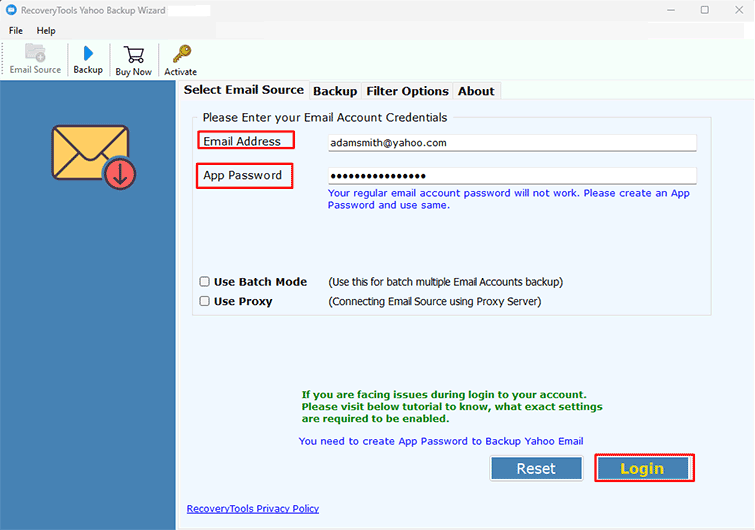
- Select Yahoo option and enter your Yahoo Mail account details.
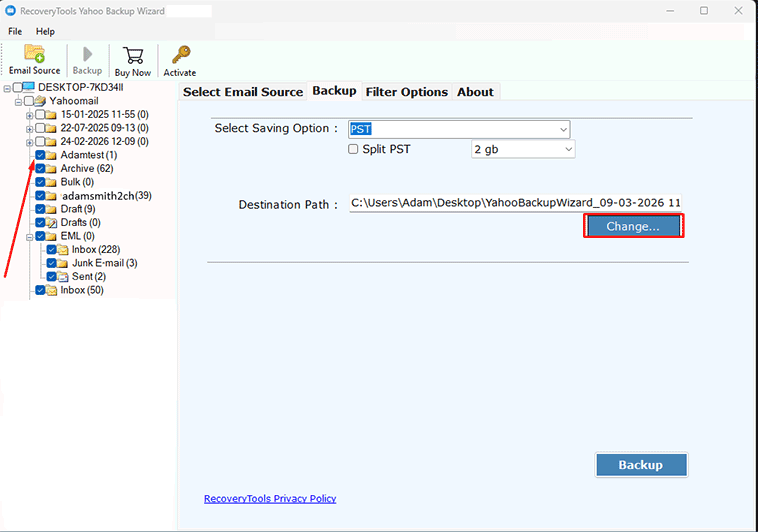
- Select the email folders to extract email attachments.
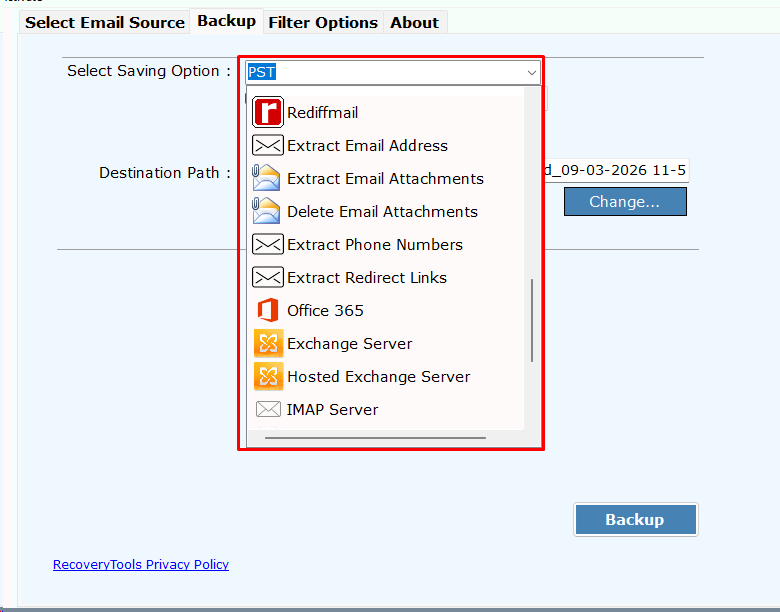
- Pick Email Attachment Extract option in the file saving list.
- Click the Next button to export Yahoo email attachments.
How to Download Multiple Attachments from Yahoo Mail? Steps
- First, run the software on your Windows & Mac computers and Windows Server machine.
- Thereafter, select the Yahoo Mail option and enter your Yahoo Mail account credentials.

- After that, choose the required email folders from which you want to extract attachments.
- Thereafter, pick the Extract Email Attachments option in the list of file saving options
- Thereafter, select the destination path by clicking the Browse option.
- Click the Backup button to export email attachments from Yahoo to local computer.
Yahoo Attachment Extractor: Benefits & Its Features
- Keep your original folder structure intact: The downloader preserves your original folder structure and format and attaches metadata; it has the ability to keep a complete copy of your received files; this is not possible when you manually download.
- Advanced filtering options: You can selectively download attachments based on specific criteria such as date, sender, or subject, beside the ability to download multiple attachments from Yahoo Mail.
- The downloader supports multiple Yahoo accounts: If you manage or have multiple Yahoo addresses; you can upload a CSV file containing the details of all of your accounts if you want to learn how to download attachments from multiple emails in Yahoo at the same time.
- Extracted documents can be exported to a portable format: Professional downloaders provide a way for you to properly manage your data so that once documents have been extracted, they can be archived in a universally accepted format such as PDF.
- 100% Secure User Interface: The professional downloaders do not store your passwords in any cache on the user interface.
Common FAQs
Q 1: how to download all attachments in Yahoo Mail at once?
The built-in option to generate one zip file per email is not available; therefore, third-party tools like Yahoo Attachment Downloader by RecoveryTools are required to bulk download Yahoo mailbox attachments.
Q 2: Why am I unable to download attachments from Yahoo Mail in Google Chrome
A weak connection, an outdated web browser, a current cache, antivirus software running, or Yahoo Mail not responding because its server is down may cause your issue if you cannot download attachments from Yahoo Mail. Clearing your cache usually resolves these problems.
Q 3: Where does Yahoo Mail download attachments?
By default, Yahoo Mail delivers attachments to your device’s normal “Downloads” folder, (Ctrl + J) Windows or (Cmd/Option + L) Mac to view a list of your downloads in the web browser.
Conclusion
You need to secure your Yahoo Mail attachments to keep them stored offline and avoid any connectivity problems with the server or problems downloading attachments from Yahoo Mail. There are many free ways to access an attachment through Yahoo Mail, including by manually downloading files. Using a third-party tool, such as the Yahoo Mail attachment downloader, provides you with a fast and secure means of retrieving your attachments from Yahoo Mail without losing your folder structure when you need to download multiple attachments from Yahoo Mail. You should take the necessary steps to secure your attachments through your local hard drive for all of your important documents for business and personal use.