Blog
Blog  +1 7025533020
Export Webmail to PST on Mac & Windows Without Losing Emails


To export webmail to PST (Outlook Data File) you can either use Microsoft Outlook Classic with its in-built “Import/Export” feature or an automated webmail to PST converter as no Webmail including Roundcube, Horde, another IMAP-based webmail service cannot directly export to PST because it is a proprietary email format of Microsoft. Here we have given step-by-step instructions for both methods to download webmail to PST, while preserving your complete mailbox data – attachments, folder structure, and all email properties.
Why Save Emails from Webmail to PST File?
PST (Personal Storage Table) is Microsoft’s proprietary mailbox format that can store emails, attachments, contacts and calendar locally. Saving webmail data in PST format is often required for compliance & data-protection based backup, moving to Exchange environments and even offline access in Outlook.
- Ideal Backup Format: It can store multiple mailbox elements, can be password protected (making it secure), have lesser consistency issues when used with Outlook (due to built-in repair utility) and can be easily restored back to the original webmail account using Outlook and a dedicated tool. Most common need at the point of employee off-boarding or before account deletion.
- Offline Long Term Access: Users export their Webmail messages to PST files so that they can be easily accessed offline locally in Outlook without an internet connection.
- Migration to Exchange Environment: Exporting Webmail data to PST files makes it simpler to migrate Webmail users to Office 365 with the use Azure AZ copy tool while keeping all data intact. This is much helpful when dealing with multiple mailboxes.
Prerequisite: Before you start to download Webmail emails to PST files ensure you have the correct credentials of your account and you have required space on your disk for seamless action.
Automated Way to Export Any Webmail to PST File: Using Pro Tool
RecoveryTools Webmail Backup Tool is a one stop solution to download all emails, attachments with preserved folder structure from Webmails like Roundcube, cPanel, SquirrelMail etc. to PST files on Mac & Windows without needing Outlook installation – even from multiple accounts simultaneously in a secure way.
Important: The RecoveryTools Webmail to PST file converter also offers a free demo to export 25 emails per Webmail folder (Inbox, Sent, Draft & Custom Folder).
Note: In case you need to download emails from Webmails like Outlook.com, Yahoo, Gmail, Icewrap and other webmail services to PST files use RecoveryTools Email Backup tool which is a one stop utility for all.
Steps to Complete the Webmail to PST Export Using Tool
- Download and install the Webmail to PST converter on your computer.
- Choose your Webmail service from the source panel.
- Enter your Webmail account credential and connect your account.

- Choose the Webmail folders you want to export as PST.

- Select PST as the saving option from the drop-down and press the “Backup” button.
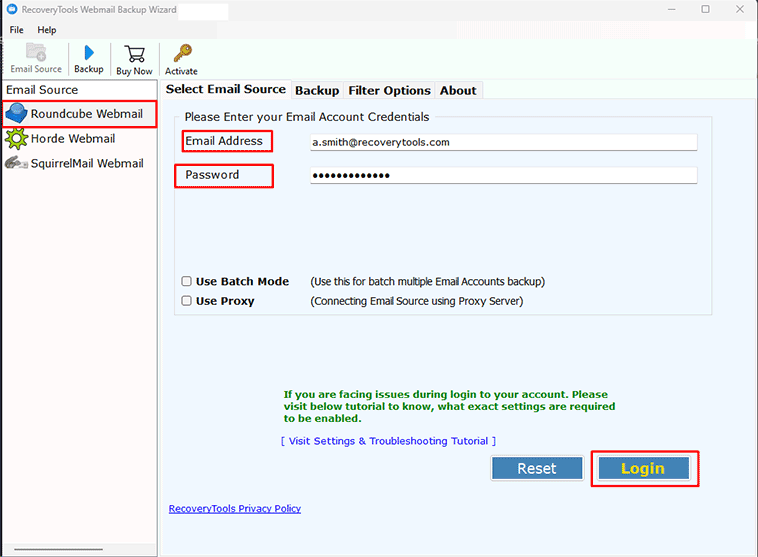

Once you have exported emails from your Webmail account to PST files you can access the emails by using Outlook Classic (Right-Click and Open with Outlook) or using a PST viewer tool.
Key Features of RecoveryTools Webmail to PST Converter
Using a suitable way to download emails from webmail as Outlook data files due to added advantage like:
- Bulk & Batch Webmail to PST Conversion
The tool can handle multiple mailboxes at once without any limitation on the number of emails, mailbox size or number of accounts. - Selective Export
There are advanced filters that let you save webmail emails to PST selectively based on date range, sender & receiver addresses, exclude folder option and subject keywords. - Merge & Split Output PST
Using the tool you can create a single PST file by merging multiple accounts into one, split the output file into smaller sizes like 2GB, 4GB, 8GB for easier future imports and easy handling etc. - Preserve All Webmail Attributes
Webmail email attributes like email message, body, header components like – Subject, CC/BCC, Date and Time, sender & receiver addresses all are preserved. - Secure Connection
Your account credentials and email data remain fully secure and not stored inside the application or moved to any external server. The tool simply helps you meet GDPR, HIPAA, SOX compliance standards.
Added Benefit: The tool also provides you with an option to change the root folder. It also gives you a detailed log report after export for audit and tracking purposes.
Although the tool can download Webmail data to PST and has various advantages it also has certain limitations such as Contacts, calendars, notes, and tasks are generally not exported and server-side rules, filters, and forwarding settings remain on the webmail as they are not transferred via IMAP.
Manually Export Webmail to PST Using Microsoft Outlook Classic
Outlook Classic lets you download emails from Webmail accounts to PST files if they are configured via IMAP or POP enabled. The process involves configuring the account and exporting Webmail to PST using the Outlook desktop’s built-in Import/Export Wizard.
Note: You can only save external webmail data to PST using Microsoft Outlook Classic (2024/2021/2019) and not using Outlook New – as it requires an M365 account subscription.
- Open Microsoft Outlook Classic on your PC.
- Click on File >> Add Account and configure your Webmail account.
- After Sync is completed go to File >> Open & Export >> Import/Export.
- Choose Export to a file option and click Next.
- Select Outlook Data File (.pst) as the saving type and click Next.
- Select the webmail folders that you want to save as a PST file.
- Browse the saving destination and press Finish.
Limitations of Manual Way to Download Webmail to PST
- Max export from a single mailbox is limited to 50 GB.
- Can only export multiple single webmail accounts to PST files at once.
- Errors like 0x80004005, operation failed or data not synchronized which do require troubleshooting.
Quick Comparison: Manual VS Pro Way to Extract Webmail Data to PST
| Factor | Using Outlook Classic | Using RecoveryTools |
|---|---|---|
| Compulsory Outlook Installation | Yes | No – Standalone Tool |
| Batch Export Multiple Account | No | Yes |
| Export Speed | Moderate – as depends on complete mailbox sync | Faster as compared to manual method |
| Manage Output PST | No | Split/Merge/Separate & Even Change Root Folder |
| Selective Email Level Precise Filter | No | Yes |
FAQs: Backup Webmail to PST
Q: Is it possible to directly export emails from webmail to PST file?
No. There is no Webmail interface that enables direct export to PST. This is because it is a proprietary mailbox format by Microsoft. You either require an Outlook desktop application or an automated Webmail to PST converter for the same.
Q: Which webmail services can you export to PST?
Almost all IMAP enabled webmail services like Roundcube, Horde, cPanel Webmail, SmarterMail, MailEnable Webmail, IceWarp, Atmail etc. can be exported as Outlook Data File (.pst).
Q: Will exporting email messages as PST from my Webmail account delete them from the server?
No. When you export you create a local copy of your mailbox. You don’t delete the emails from your original webmail account.