Blog
Blog  +1 7025533020
How to Migrate Comcast Email to Yahoo Mail?


If you want to migrate Comcast email to Yahoo mail, then you are in the right place. With Xfinity officially transitioning its email backend to Yahoo’s infrastructure, so many users are choosing actively to move comcast email to Yahoo mail account instead of waiting for an automated switch they cannot full control.
This guide explains everything you need to know about how to migrate Comcast email to Yahoo mail using two verified methods: a manual one through Microsoft Outlook and a professional dedicated automated solution. Hence, both methods are tested and explained step by step so that even non-technical can also follow along without any confusion.
How to Migrate Comcast Email to Yahoo Quickly ( Summary Steps )
If you already understand the basics and want a quick reference, the here are the core steps to transfer comcast email to Yahoo Mail using the automated solution:
- Download and Install the given Comcast to Yahoo Backup Wizard on your Windows or Mac. (Scroll downwards.)
- Select the C0mcast as the source and enter your credentials
- Select the folders you need to move, such as Inbox, Sent, Drafts, or all folders.
- Choose Yahoo Mail as the destination and enter yahoo credentials.
- Apply filters if needed such as date range or specific senders.
- Click backup and let the tool transfer all comcast emails to Yahoo Mail.
What Does It Mean to Transfer Comcast Email to Yahoo Mail?
There is confusion regarding the Comcast email changes for 2026. Let’s discuss it before you want to migrate Comcast email to Yahoo Mail.
Right now, two different scenarios are playing out:
- The Official Migration: Xfinity is partnering with Yahoo to host their email service. Your @comcast.net inbox will look like Yahoo Mail, but Xfinity still manages it.
- User-Controlled Transfer: This is when you proactively move your Comcast emails to a personal Yahoo account (@yahoo.com) or a local backup.
When we discuss how to transfer Comcast email to Yahoo in this post, we are focusing on the second option. This is your “insurance policy”-ensuring you have a copy of your data that is independent of Xfinity, protecting you from any issues during the official switch.
Why You Need to Transfer Comcast Email to Yahoo Mail?
Officials’ migration claims to be seamless, but many users are concerned. We’ve mentioned the reasons why experts recommend you import Comcast email to Yahoo Mail before the big switch:
- Automatic migrations can sometimes skip files larger than 25MB or corrupt older messages to avoid data loss.
- There is no Xfinity email export portal to download your data. If you don’t move it yourself, it’s stuck on their servers.
- Prevent Access Issues: If you cancel Xfinity internet, your account could be marked as Comcast email disabled if you don’t log in every 9 months.
- Secure Backup: Moving data to a standard Yahoo account gives you a completely independent cloud backup.
- Maintain Organization: Automated transfers often dump everything into one big pile; a manual transfer keeps your folder structure intact.
Comcast and Yahoo IMAP/SMTP Settings
Whether you are using Outlook, thunderbird, or another email client, you will need the correct server settings to migrate Comcast email to Yahoo.
For Comcast:
- IMAP Server: imap.comcast.net
- IMAP Port: 993 ( incoming ) , 587 (outgoing)
- Encryption: SSL/TLS
For Yahoo:
- IMAP Server: imap.mail.yahoo.com
- Port: 993 (incoming), 587 (outgoing)
- Encryption: SSL/TLS
Manual Methods to Import Comcast Emails to Yahoo Mail
If you’re ready to secure your data, you generally have three options to choose from:
- Manual Forwarding: This is only reliable if you need to save a handful of specific Comcast emails.
- IMAP Configuration (Outlook/Thunderbird): Connects both accounts to a desktop client and allows for drag-and-drop.
- Professional Automated Tool: The safest and fastest way to bulk migrate Comcast email to Yahoo Mail without technical configuration.
Migrate Emails from Comcast to Yahoo: Manual Method
The manual method works with small mailboxes and specific Comcast emails. You can migrate Comcast email to Yahoo Mail manually using a desktop client such as Microsoft Outlook.
- Open Outlook and navigate to File and then click on Add Account.
- Type in your Comcast email login credentials. You need to check “Third-party access” in Xfinity settings.
- Once Comcast is connected, repeat the process to add your Yahoo Mail account.
- If you use an old Yahoo Mail login, make sure to generate an “App Password” in Yahoo security settings, or Outlook won’t connect.
- When both accounts appear in the sidebar, click a Comcast folder (like Inbox).
- Select your emails (Ctrl + A), drag them, and drop them into the corresponding Yahoo folder.
Limitations of the Manual Method
The manual method is free, but experts don’t recommend it for a full Comcast to Yahoo Mail migration. There are several risks, such as:
- Dragging heavy folders often causes Outlook to freeze, creating a high risk of data loss.
- Files larger than 25MB frequently fail to sync, resulting in broken or missing attachments.
- Manual syncing migrate Comcast email to Yahoo Mail into generic lists, which leads to a completely lost folder structure.
- It is Time-consuming because the process depends entirely on the internet speed.
Professional Method to Transfer Comcast Email to Yahoo Mail
A reliable solution like RecoveryTools Comcast Backup Wizard provides an alternative to manual syncing. This removes the risk of data loss and app crashes. The software can handle large mailboxes and provides a direct, secure connection to the server for exporting Comcast emails to Yahoo without disruption.
It ensures every single Comcast email is transferred securely, regardless of attachment size. Plus, it automatically maps your folder hierarchy when you migrate Comcast email to Yahoo Mail. You won’t have to waste time reorganizing your inbox after the move. By bypassing the lack of an Xfinity email export portal, the tool delivers a fast, precise, and 100% accurate Comcast to Yahoo Mail migration.
My Personal Experience
I recently helped a small business owner who was in panic. They heard rumors asking, ‘Is the Comcast email going away?’ and had over a decade of client invoices stored in their account.
We tried the manual drag-and-drop method via Outlook first, but it kept crashing because their mailbox was 15GB. Then we switched to this automated solution, and it was a game-changer. It finished the transfer in under 40 minutes and kept their complex ‘invoices’ folder structure perfect. It was a total lifesaver.
How to Move Comcast Email to Yahoo Mail in Simple Steps?
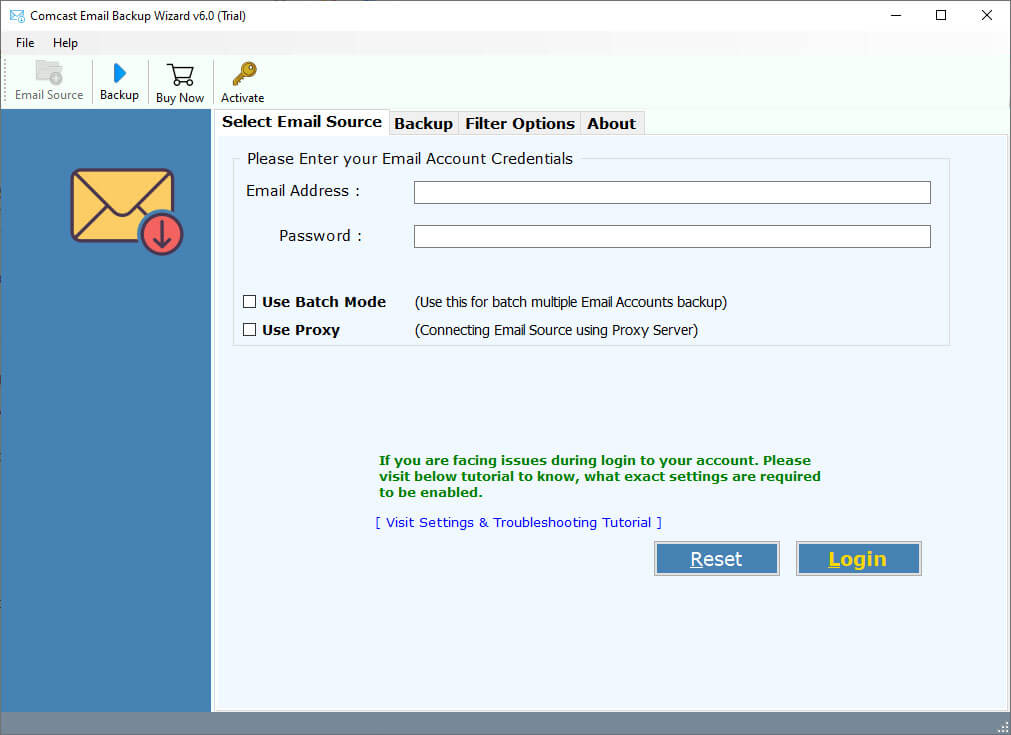
- Download and run the automated Comcast to Yahoo Migration software on your computer.

- Select “Comcast” from the source and enter your Comcast email address and password.
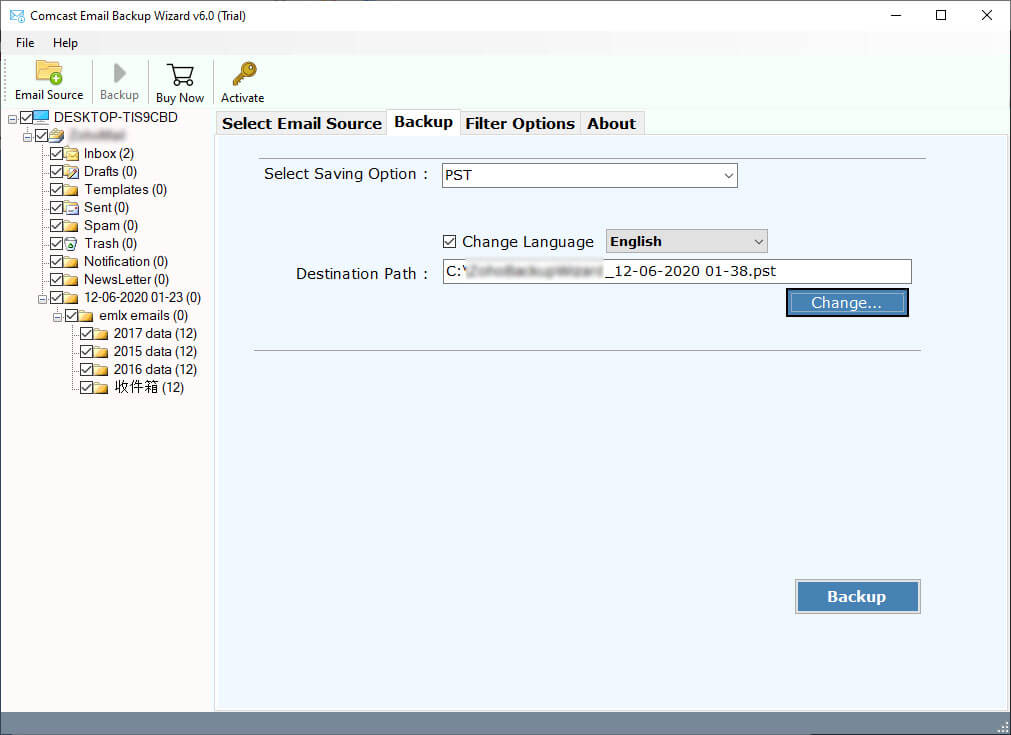
- Check the required boxes for the folders you want to move, such as Inbox, Sent, Drafts, etc.
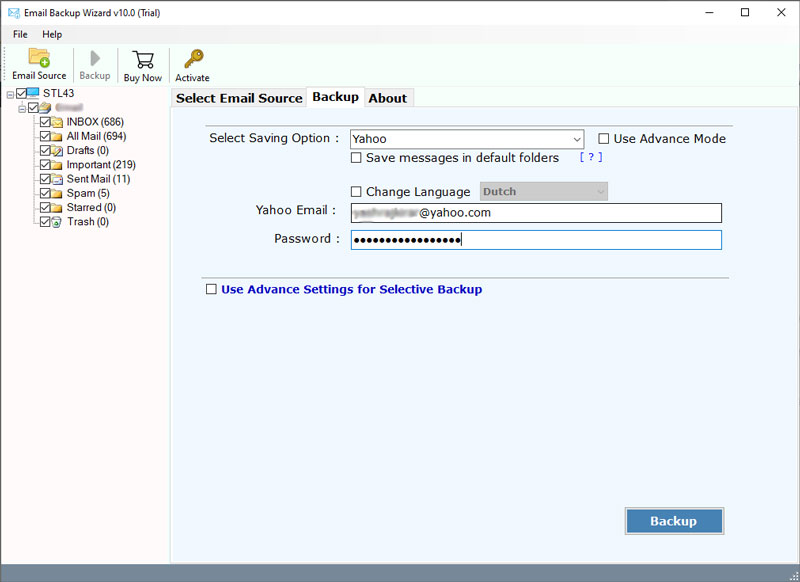
- Choose Yahoo in the “Select Saving Option” list.
- Click on the Backup button. The software will immediately begin to migrate Comcast email to Yahoo.


Key Benefits of Using a Professional Method
- Zero Data Loss: Guarantees accuracy, securely moving Comcast emails and attachments to Yahoo Mail even if they exceed the standard 25MB limit.
- Maintains Hierarchy: Your folder structure in Yahoo will look the same as it did in Comcast—no re organization needed.
- Advanced Filters: Includes a “Selective Backup” mode, letting you migrate Comcast email to Yahoo Mail by Date Range, Subject, or Sender.
- Status Retention: It ensures that read Comcast emails stay read, and unread emails remain unread, keeping metadata intact.
- Total Privacy: Unlike risky online tools, everything runs locally on your computer. Your Comcast emails and data remain secure.
FAQs: Transfer Comcast Emails to Yahoo Mail
Q1: How do I move Comcast email to Yahoo?
Ans: You can move it through two methods. The First is a manual approach with a basic drag-and-drop function, and the second is through an automated solution to download all folders and attachments directly.
Q2: How do I export emails from Comcast?
Ans: Use a third-party backup software to extract the data through IMAP and save it to your local drive because Xfinity does not provide a download button or export portal.
Q3: Can I upgrade email if I leave Comcast?
Ans: Yes, you can. As long as you log in to the web portal once every 9 months, your address remains active. However, moving your data to a provider like Yahoo is a smart choice, now you don’t lose access if the account gets disabled.
Conclusion
The 2025 update for Comcast email is coming. While Xfinity plans to move everything for you automatically, it’s risky to trust a machine with all your memories and important files.
It is much safer to move Comcast email to Yahoo Mail yourself. This way, you know your data is backed up and safe, no matter what happens during the switch. Don’t wait until it’s too late-download a third-party software and secure your Comcast emails today.